Table of Contents
- Introduction
- Understanding Kubernetes Autoscaling
- What is the Horizontal Pod Autoscaler
- How HPA Works Internally
- When to Use HPA
- What is the Vertical Pod Autoscaler
- How VPA Works Internally
- When to Use VPA
- Can HPA and VPA Coexist
- Kubernetes Resource Optimization Best Practices
- Challenges with Autoscaling
- Monitoring Your Autoscaling Logic
- Comparing Scaling Strategies
- Conclusion
Introduction
Managing resource allocation in modern containerized environments is a constant balancing act. If you allocate too much, you waste money; if you allocate too little, your application crashes under pressure.
Kubernetes provides native mechanisms to handle these fluctuations dynamically. Understanding Kubernetes autoscaling is essential for maintaining both performance and cost-efficiency in production.
Understanding Kubernetes Autoscaling
At its core, scaling in a cluster is about adjusting the amount of compute power available to your workloads. Without automated scaling, developers must manually intervene whenever traffic spikes or drops.
This manual approach is error-prone and rarely keeps pace with real-world traffic patterns. Automation allows your infrastructure to breathe alongside your application.
By leveraging automated tools, you ensure that your services remain responsive during peak times. Simultaneously, you reclaim unused resources during quiet periods to lower your infrastructure bill.
- Maintains application availability
- Reduces manual operational overhead
- Optimizes cluster resource utilization
What is the Horizontal Pod Autoscaler
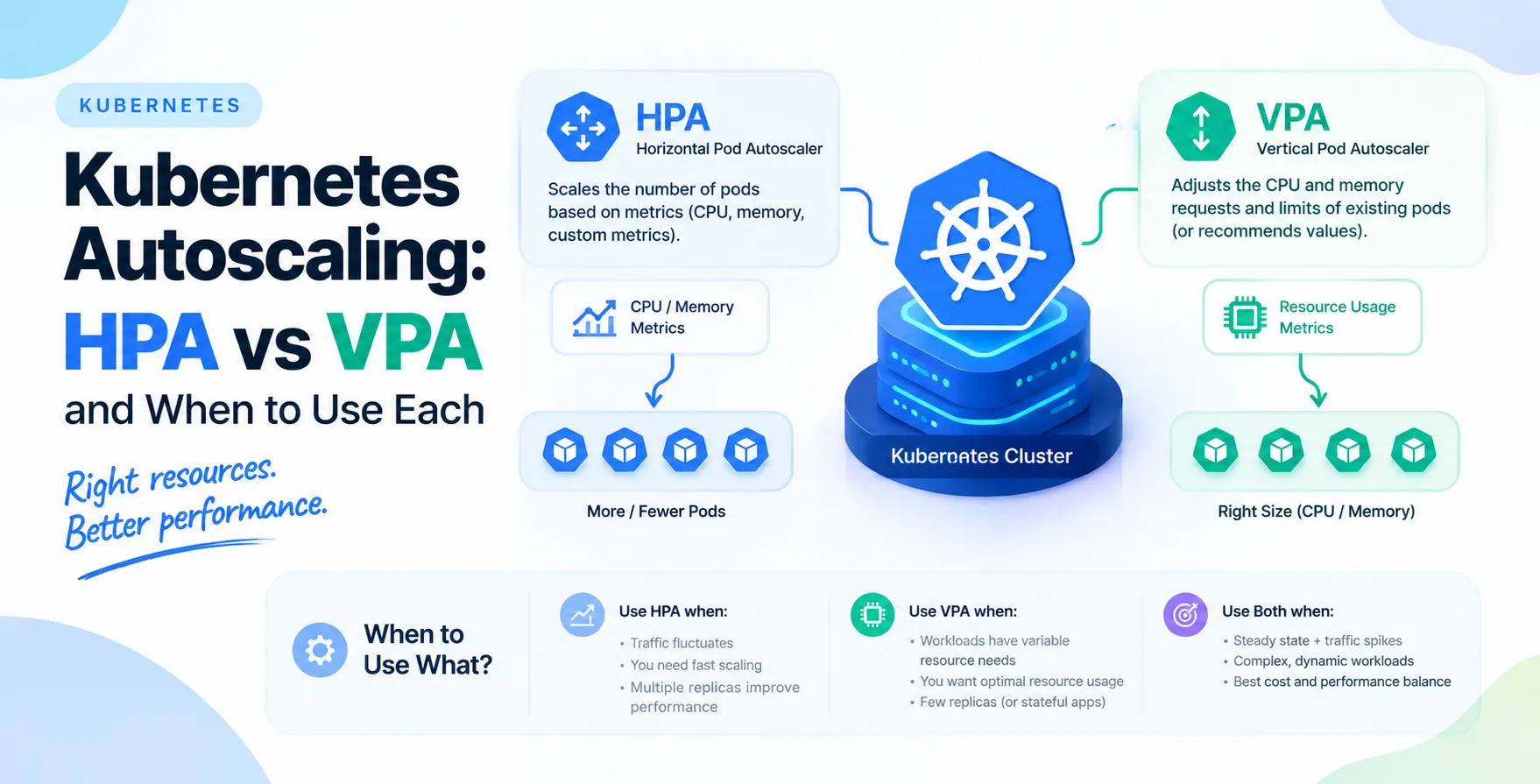
The Horizontal Pod Autoscaler, or HPA, is the most common scaling method used by engineers. It works by increasing or decreasing the number of replicas of a pod based on observed metrics like CPU or memory utilization.
Think of it as adding more workers to a task when the current team is overwhelmed. When the load subsides, it removes the extra workers to keep costs down.
This approach is highly effective for stateless applications that can easily scale across multiple instances. It is usually the first line of defense against sudden traffic spikes.
- Scales by adding pods
- Responds to CPU and memory usage
- Ideal for stateless microservices
How HPA Works Internally
HPA functions by continuously monitoring the metrics API for your target deployment. It calculates the desired replica count based on your defined utilization thresholds.
Once the average utilization exceeds your target percentage, HPA initiates a rolling update to spin up new pods. It stops adding pods once the utilization falls within your specified range.
This process ensures that no single pod is taking on more than its fair share of the traffic. It acts as a safety valve for your services.
- Polls metrics every few seconds
- Updates deployment replica counts
- Adjusts based on custom metrics too
When to Use HPA
You should prioritize HPA when your application is stateless and can handle concurrent requests across multiple instances. It is excellent for web services and APIs that face unpredictable traffic.
If you find that your service latency increases during peak hours, HPA is your primary tool for relief. It horizontally distributes the load to keep response times stable.
Always pair HPA with appropriate resource requests and limits to ensure accurate metrics. Without them, the autoscaler cannot determine if a pod is actually under pressure.
- High traffic variability
- Stateless service architectures
- Predictable performance requirements
What is the Vertical Pod Autoscaler
The Vertical Pod Autoscaler, or VPA, takes a different approach by adjusting the resource requests and limits of existing pods. Instead of adding more pods, it makes the existing ones larger or smaller.
It monitors the historical resource usage of your containers and updates the pod configuration accordingly. This is particularly useful for resource-heavy applications that cannot easily scale horizontally.
VPA helps you find the sweet spot for your container resource requests. It prevents you from over-provisioning memory or CPU for stable workloads.
- Scales by resizing pods
- Analyzes historical usage patterns
- Optimizes resource requests
How VPA Works Internally
VPA works by observing the actual resource consumption of your pods over time. It compares this against the initial values defined in your deployment manifest.
When it detects a significant gap between reality and configuration, it triggers a recommendation update. In most cases, it will restart the pod to apply the new resource limits.
This restart is necessary because CPU and memory limits cannot be changed on a running container. It essentially replaces the old pod with a new, better-sized one.
- Monitors resource usage trends
- Calculates optimal requests
- Restarts pods to apply changes
When to Use VPA
VPA is best suited for stateful services or applications that have a fixed, non-distributed architecture. It is also a powerful tool for right-sizing your deployments during the development phase.
If you have an application that struggles to handle large amounts of data in a single instance, VPA provides it with more headroom. It is also useful for background processing tasks that have consistent, predictable resource needs.
Use VPA to reduce the guesswork in setting container resource requests. It keeps your cluster clean and prevents wasted overhead.
- Stateful applications
- Fixed-size workloads
- Optimizing resource requests
Can HPA and VPA Coexist
Running both HPA and VPA together is possible, but it requires careful planning to avoid conflicts. The two systems can fight each other if they are configured to scale based on the same metric.
For example, if both are targeting CPU usage, the HPA might spin up new pods while the VPA tries to resize them simultaneously. This leads to unstable behavior and unnecessary pod churn.
A common pattern is to use VPA for memory and HPA for CPU. This separation of concerns allows each controller to manage the resource dimension it is best at optimizing.
- Avoid conflicting target metrics
- Use VPA for memory sizing
- Use HPA for CPU scaling
Kubernetes Resource Optimization Best Practices
Effective Kubernetes resource optimization requires a proactive mindset toward infrastructure management. Start by setting reasonable resource requests and limits for every container in your cluster.
Always review your usage reports periodically to identify inefficiencies. If your applications are consistently using only 20% of their allocated memory, your resource requests are likely too high.
Invest in tools that provide visibility into your cluster's footprint. Understanding exactly what your applications consume is the first step toward significant cost savings.
- Set accurate resource requests
- Review usage metrics weekly
- Use namespace quotas wisely
- Monitor node utilization trends
- Automate right-sizing cycles
Challenges with Autoscaling
Autoscaling is not a magic solution that solves all performance issues. One major challenge is the time it takes for new pods to start up and become ready to serve traffic.
If your application has a long startup time, HPA might be too slow to handle a sudden traffic spike. You might need to pre-warm your pods or adjust your scaling thresholds.
Another issue is node pressure. If your cluster is out of physical capacity, the autoscaler cannot create new pods regardless of the configuration. You also need a Cluster Autoscaler to add nodes to the pool.
- Slow application startup times
- Limited physical cluster capacity
- Metric data latency
Monitoring Your Autoscaling Logic
You cannot effectively manage what you do not measure. Monitor your autoscaling events closely to see if your configurations are actually performing as expected.
Look for frequent scaling oscillations where your cluster adds and removes pods too rapidly. This often indicates that your thresholds are too sensitive or your metrics are too noisy.
Use logging to capture every scaling decision made by the control plane. This helps you debug issues when your application behaves unexpectedly during high load.
- Track scaling event logs
- Visualize resource usage trends
- Audit configuration changes
Comparing Scaling Strategies
| Feature |
HPA |
VPA |
| Scaling Method |
Horizontal |
Vertical |
| Best For |
Stateless/Web |
Stateful/Background |
| Pod Impact |
Adds/Removes Pods |
Restarts Pods |
| Primary Goal |
Throughput |
Resource Efficiency |
| Configuration |
Metric-based |
History-based |
Conclusion
The choice between HPA and VPA depends entirely on the nature of your workloads and your specific performance goals. HPA is the standard for managing traffic-heavy, stateless services, while VPA excels at optimizing resources for stable or memory-intensive applications.
By understanding the nuances of HPA vs VPA, you can build a more resilient and cost-effective cluster. Start by auditing your current resource usage and implementing scaling policies that match your traffic patterns.
Mastering these tools is a crucial step in maturing your infrastructure. With the right strategy, you can ensure your applications remain performant while keeping your cloud costs under control.


 In collaboration with