Table of Contents
- Introduction to API Data Handling
- Why Pagination Matters for Modern APIs
- Offset-Based Pagination Explained
- Limitations of Offset-Based Approaches
- The Power of Cursor Pagination
- Comparing Pagination Techniques
- Designing for API Pagination Performance
- Handling Dynamic Datasets
- Security Considerations for Paginated Endpoints
- Best Practices for Client-Side Implementation
- Testing Your Pagination Strategy
- Future-Proofing Your API Design
- Conclusion
Introduction to API Data Handling
Handling large volumes of data is a fundamental challenge in custom API development. When your database contains millions of records, returning the entire set in a single HTTP response is never an option.
It crashes clients, spikes memory usage, and destroys network performance. This is where pagination becomes essential for any scalable system.
Why Pagination Matters for Modern APIs
Effective data management ensures that your application remains responsive under heavy load. By breaking resources into manageable chunks, you drastically reduce the processing burden on both the server and the requesting client.
Well-implemented REST API pagination also improves the developer experience. Consumers can request exactly what they need, leading to cleaner code and faster application startup times.
- Prevents server memory overflow
- Reduces latency for API consumers
- Optimizes database query execution
- Lowers network bandwidth consumption
Offset-Based Pagination Explained
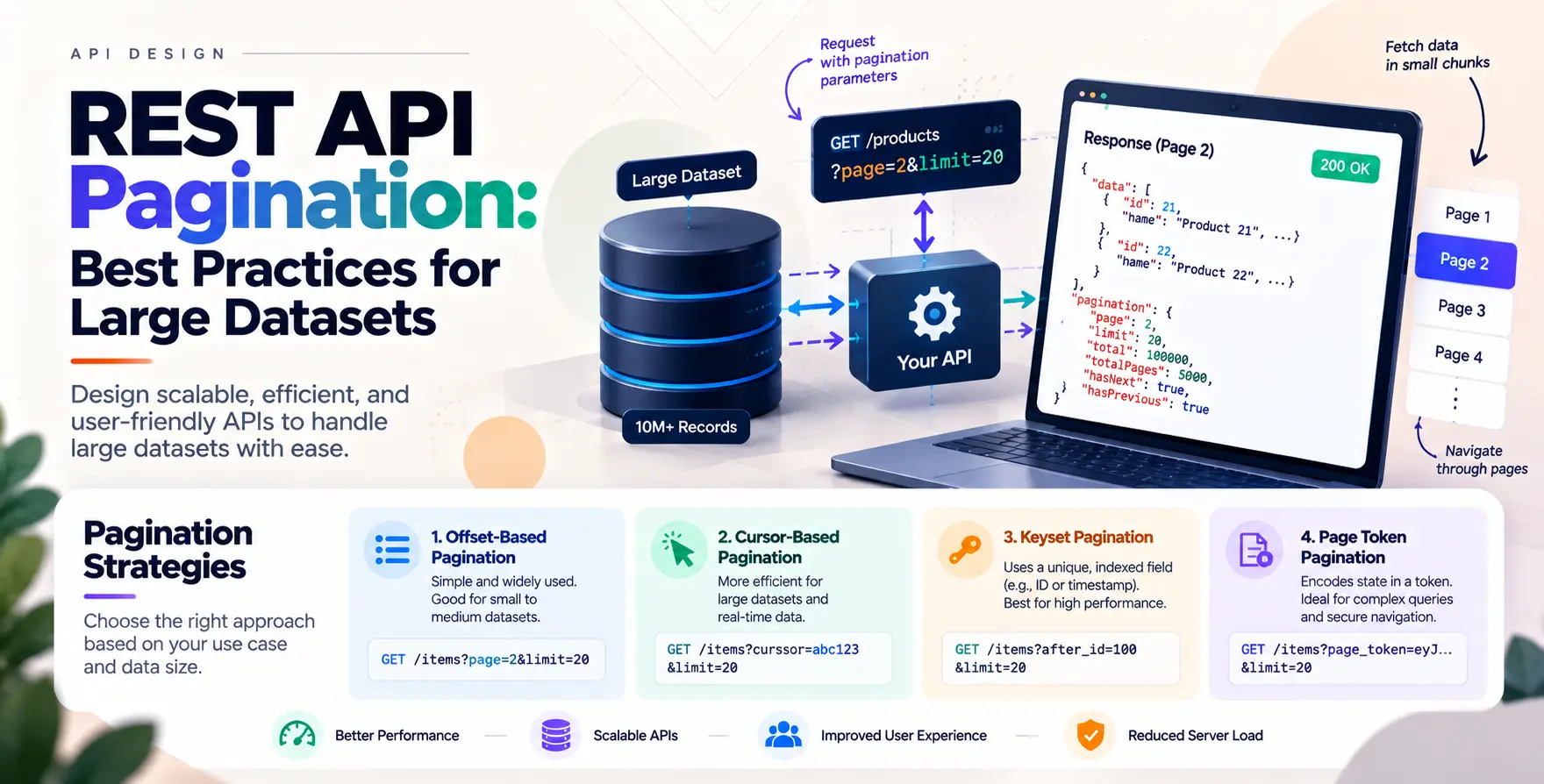
Offset-based pagination is the most common approach for simple applications. It typically relies on two query parameters: limit and offset.
The server calculates how many items to skip before returning the requested batch. It is intuitive for developers and easy to implement using standard SQL syntax like LIMIT and OFFSET.
- Easy to implement in most frameworks
- Allows users to jump to specific pages
- Works well for smaller, static datasets
Limitations of Offset-Based Approaches
While simple, offset-based methods often fall short when dealing with high-frequency updates. As users navigate through pages, new records might be inserted, causing items to shift unexpectedly.
This results in duplicate entries or skipped data across different pages. Furthermore, performance degrades as the offset value increases because the database must scan and discard all preceding rows.
Performance Degradation
As the offset grows, the database engine works harder to reach the target data point. This makes deep pagination increasingly slow for large datasets.
- High query latency at deep pages
- Data inconsistency with frequent inserts
- Inefficient scanning of discarded rows
Inconsistent Result Sets
When data is volatile, the relative position of items changes constantly. Users navigating between pages might see the same record twice or miss records entirely during their session.
- Risk of duplicate data display
- Risk of missing records in sequence
- Unreliable navigation for dynamic lists
The Power of Cursor Pagination
For high-scale applications, cursor pagination is the industry standard. Instead of using a numerical offset, the server provides a pointer—a cursor—that identifies the last item seen in the previous response.
The database uses this unique identifier to start the next query from the exact point where the last one ended. This ensures consistency even when the underlying data changes between requests.
- Maintains data consistency during updates
- Provides high performance for deep pages
- Avoids scanning unnecessary records
- Perfect for infinite scroll interfaces
Comparing Pagination Techniques
| Feature |
Offset-Based |
Cursor-Based |
| Implementation |
Simple |
Complex |
| Deep Paging |
Slow |
Fast |
| Data Stability |
Low |
High |
| Random Access |
Easy |
Difficult |
| Index Usage |
Minimal |
Optimal |
Designing for API Pagination Performance
Optimizing your API pagination performance requires more than just picking a strategy. You must ensure that your database queries are indexed correctly based on the sorting criteria.
Always enforce a maximum limit on page size to protect your server from malicious requests. Allow clients to request smaller batches, but never let them bypass your internal safety caps.
Handling Dynamic Datasets
When dealing with constantly changing data, your pagination logic must be resilient. Using deterministic sorting, such as a primary key or a timestamp, ensures that the cursor remains valid.
If you sort by a non-unique field, your pagination will break when multiple items share the same value. Always append a unique identifier to your sorting clause to keep the order stable.
- Enforce deterministic sorting order
- Always include unique ID in sort
- Monitor for data drift
- Validate cursor integrity
Security Considerations for Paginated Endpoints
Pagination endpoints are often targets for resource exhaustion attacks. Attackers might request extremely large page sizes to overwhelm your server's memory or database connections.
Implement strict rate limiting on these endpoints to prevent abuse. Ensure that your API authentication methods are robust enough to handle the volume of requests generated by crawlers or automated scrapers.
Best Practices for Client-Side Implementation
Clients should be designed to handle paginated responses gracefully. Always check for the presence of a next link or a cursor in the response body before attempting to fetch the next batch.
Avoid building hardcoded page numbers into your UI logic. Instead, treat the pagination metadata as a black box provided by the API to ensure long-term compatibility.
- Use provided metadata for navigation
- Avoid manual construction of URLs
- Implement retry logic for failed requests
- Cache results where appropriate
Testing Your Pagination Strategy
Before deploying to production, run comprehensive stress tests on your endpoints. Use automated API testing tools to verify that page boundaries are correct and that data is returned in the expected order.
Validate that your API returns appropriate error codes when an invalid cursor or offset is provided. Ensure that your documentation clearly explains the pagination format to external developers.
Future-Proofing Your API Design
APIs evolve over time, and your pagination strategy should too. If you start with offset-based pagination, you might eventually need to migrate to cursor-based approaches to maintain performance.
Versioning your API allows you to introduce these architectural changes without breaking existing integrations. Keep your endpoint contracts clean and well-documented to minimize friction for your consumers.
Conclusion
Mastering REST API pagination is a critical skill for any backend developer. By choosing the right strategy for your specific use case, you ensure that your platform scales gracefully as your user base grows.
Whether you choose offset for its simplicity or cursors for their performance, consistency and security remain paramount. Focus on these REST API pagination best practices for large datasets to build reliable, high-performance services that delight your users.


 In collaboration with