Table of Contents
- Introduction
- Understanding the OAuth Device Flow
- When to Use the Device Authorization Flow
- How the Flow Works
- User Experience and Security Trade-offs
- Implementing the OAuth Device Code Grant
- OAuth for CLI Applications
- Security Considerations for Device Flows
- Handling Token Expiration and Refresh
- Best Practices for Developer Experience
- Comparing Authentication Methods
- Challenges in Device Implementation
- Final Thoughts
Introduction
Modern application ecosystems extend far beyond the desktop browser. Users expect their accounts to sync across smart televisions, gaming consoles, and command-line tools.
Authenticating these devices presents a unique challenge because they often lack a keyboard or a full web browser. The OAuth device authorization flow when and how to use it is a critical topic for developers building cross-platform experiences.
This flow allows a device to request authorization from an external user agent. By decoupling the authentication process from the device itself, you maintain high security without frustrating your users.
Understanding the OAuth Device Flow
The OAuth device flow is designed specifically for devices with limited input capabilities. It allows the device to obtain an access token by delegating the actual sign-in process to a secondary device, like a smartphone or laptop.
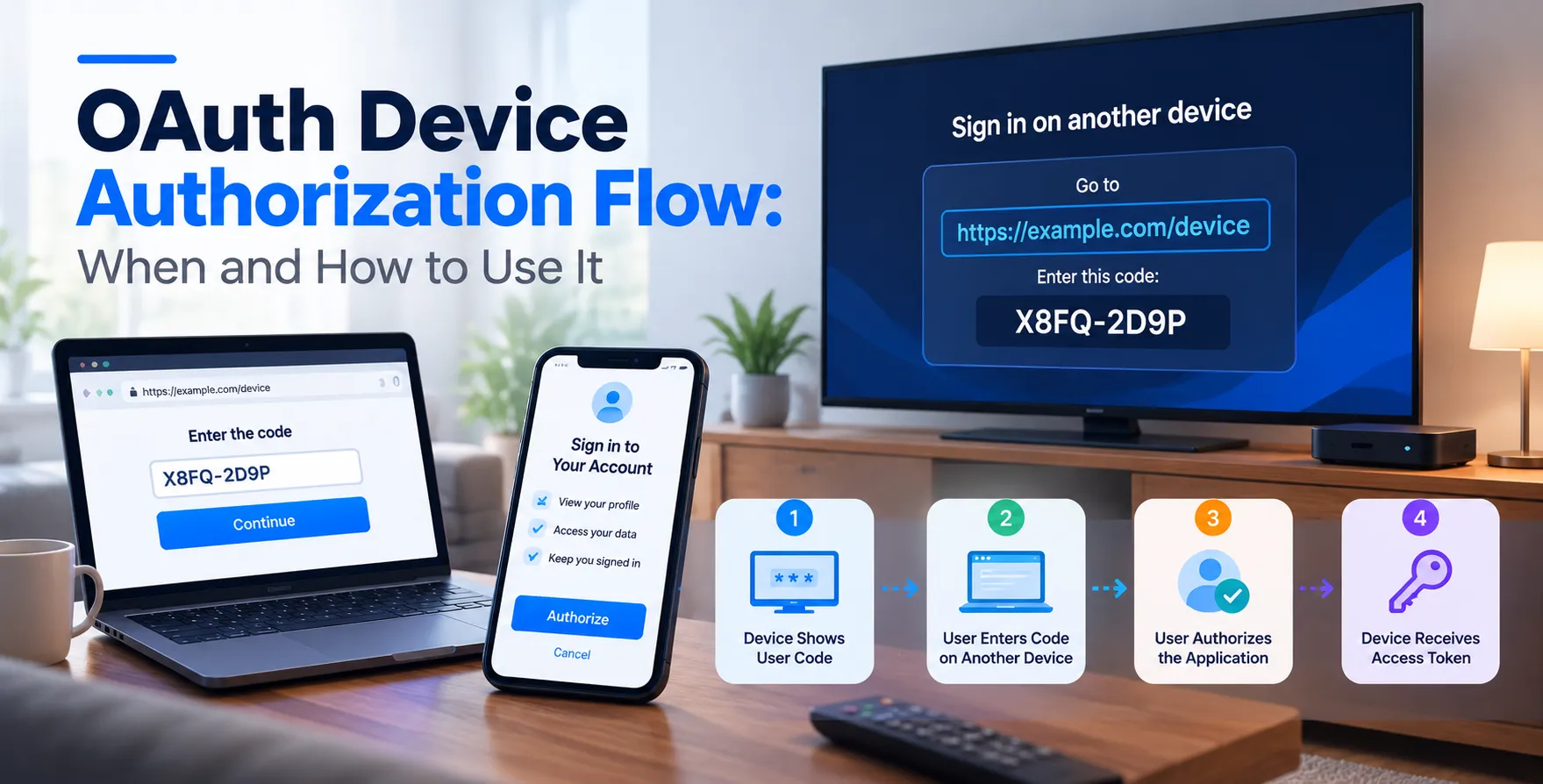
The device initiates a request and receives a short code. It then displays this code to the user, who enters it on a separate, browser-capable device.
Once the user authorizes the request on their phone or computer, the original device receives its credentials. This approach avoids forcing users to type passwords on an on-screen keyboard using a remote control.
- Separates authentication from the device
- Leverages external browser-capable devices
- Uses short verification codes
- Maintains high security standards
When to Use the Device Authorization Flow
You should consider this flow whenever you are developing software for hardware with restricted user interfaces. If the user cannot easily type a complex password, the device code grant is the industry-standard solution.
It is also the preferred authentication method for terminal-based tools where spawning a browser window might be technically complex or insecure. Integrating this flow ensures your application adheres to modern identity standards while respecting hardware limitations.
Avoid using this flow for standard web or mobile applications where a redirect-based flow is more efficient. Rely on standard browser-based flows whenever a browser is available to ensure the best user experience.
- Smart TVs and streaming boxes
- Gaming consoles and handheld devices
- Command-line interfaces and terminal tools
- Headless IoT hardware
How the Flow Works
The process follows a well-defined sequence involving the device, the authorization server, and the user's browser. The device first makes an unauthenticated request to the authorization server to initiate the flow.
The server responds with a verification URI and a user code. The device displays these instructions, prompting the user to visit the URL and enter the code.
Meanwhile, the device polls the authorization server to check if the user has completed the process. Once the user enters the code and approves the request, the server issues an access token to the device.
- Device requests a device code
- Server returns a user code and URI
- User visits the URI on another device
- User enters the code and authorizes
- Device receives the token via polling
User Experience and Security Trade-offs
Balancing security and convenience is the core of any authentication design. The device flow provides a secure way to delegate identity verification while keeping the user experience seamless.
By shifting the login task to a smartphone, you reduce the risk of shoulder surfing and keylogging on public devices. The user interacts with a familiar browser interface, which inherently supports multi-factor authentication and password managers.
However, you must be careful to keep your polling intervals reasonable to prevent excessive load on your backend services. Too frequent polling can lead to unnecessary resource consumption, while infrequent polling slows down the login process.
- Increases security via browser-based auth
- Supports MFA easily
- Requires second-device interaction
- Needs efficient polling logic
Implementing the OAuth Device Code Grant
Implementation starts by configuring your authorization server to support the device flow. You must ensure your client is registered as a device-capable client in your identity provider settings.
On the client side, your application must be capable of generating a request, handling the polling logic, and managing the resulting tokens. Always verify the client ID and scope parameters before initiating the request.
Proper error handling is vital for a smooth flow. If the user denies the request or the code expires, your application must provide clear feedback to the user on the device screen.
- Register the client correctly
- Manage polling intervals safely
- Handle expired code errors
- Store tokens securely on the device
OAuth for CLI Applications
Developers frequently use OAuth for CLI applications to handle cloud service authentication. When a user runs a command like login, the terminal displays a unique URL and code.
This keeps the CLI tool lightweight and avoids the need to implement complex browser handling inside the terminal. It is a cleaner approach than requiring users to manually copy and paste API keys or tokens.
It also allows the CLI to easily leverage the same identity provider used by the web dashboard. This ensures consistent security policies across all company tools.
- Simplifies CLI authentication
- Avoids manual key management
- Enables consistent identity providers
- Enhances developer workflow
Security Considerations for Device Flows
Security is paramount when implementing any OAuth flow. Because the device code is displayed to the user, you must ensure it remains valid for a limited time to prevent unauthorized reuse.
The authorization server should enforce strict rate limiting on token requests. This prevents malicious actors from brute-forcing verification codes by guessing or rapidly polling the authorization endpoint.
Always use HTTPS for all communications between the device and the server. Even though the authentication happens on a secondary device, the device-to-server communication remains a vector for potential interception if left unencrypted.
- Use short expiration times
- Implement strict rate limiting
- Enforce HTTPS everywhere
- Require secure client authentication
Handling Token Expiration and Refresh
Devices often remain logged in for long periods without user interaction. You must implement robust refresh token handling to maintain the session state securely.
When the access token expires, the device should use the refresh token to obtain a new one. This happens in the background, ensuring the user is never interrupted while using the device.
Store these tokens in secure enclaves or encrypted storage areas on the hardware. If the device is ever lost or decommissioned, ensure you have a mechanism to revoke the tokens from the server side.
- Automate token refreshes
- Store tokens in encrypted hardware storage
- Implement server-side revocation
- Handle token rotation policies
Best Practices for Developer Experience
Your documentation is just as important as the code itself. Clearly instruct users on where to enter the code and provide a QR code to make the process easier.
A QR code significantly reduces the friction of typing a URL on a phone. It allows the user to jump straight to the authorization page with the code pre-filled if your system supports it.
Keep the device interface clean and minimalist. Only show the necessary information and ensure the font size is readable from a distance, especially for smart TV applications.
- Use QR codes for URLs
- Provide clear error messages
- Keep UI instructions simple
- Support intuitive retry mechanisms
Comparing Authentication Methods
| Method |
Best For |
User Effort |
| Authorization Code |
Web/Mobile Apps |
Low |
| Device Flow |
IoT/CLI/Smart TV |
Medium |
| Client Credentials |
Machine-to-Machine |
None |
| Implicit Flow |
Legacy Systems |
High |
Challenges in Device Implementation
One major challenge is handling devices with intermittent network connectivity. If the connection drops during the polling phase, your application must be resilient enough to resume or restart the flow gracefully.
Another issue is managing user sessions across different device types. Ensure your identity provider correctly identifies the device source to apply the right security policies for each platform.
Lastly, keep your SDKs updated to handle changes in the OAuth specifications. Security standards evolve, and your device-side logic needs to stay compliant with current best practices to protect your users.
- Intermittent network handling
- Device-specific session management
- Dependency on external SDKs
- Compliance with evolving standards
Final Thoughts
The device authorization flow is an essential tool for modern cross-platform development. By choosing this approach, you prioritize user experience while maintaining the rigorous security standards your users expect.
Whether you are building for smart home hardware or command-line tools, understanding the nuances of this flow is critical. Start by mapping out your user journey and testing your polling logic thoroughly.
As you implement these patterns, always focus on clarity and security. A well-implemented flow creates a seamless experience that feels like a natural part of the product.


 In collaboration with