Table of Contents
- Introduction to S3 Lifecycle Policies
- Understanding Amazon S3 Versioning
- Why Storage Costs Balloon Over Time
- The Role of S3 Lifecycle Policies
- Configuring S3 Noncurrent Version Expiration
- Automating Cleanup for Multipart Uploads
- Best Practices for Cost Optimization
- Monitoring and Auditing Policies
- Comparing Manual vs Automated Cleanup
- Impact on FinOps for Engineering Teams
- Common Pitfalls to Avoid
- Integration with Cloud Cost Allocation
- Scaling Storage Policies Globally
- Conclusion
Introduction to S3 Lifecycle Policies
Storage management in the cloud often feels straightforward until your monthly bill arrives. Many teams enable versioning on their buckets to prevent accidental deletions without realizing the long-term cost implications. Without a strategy, every single update to a file creates a new, billable object.
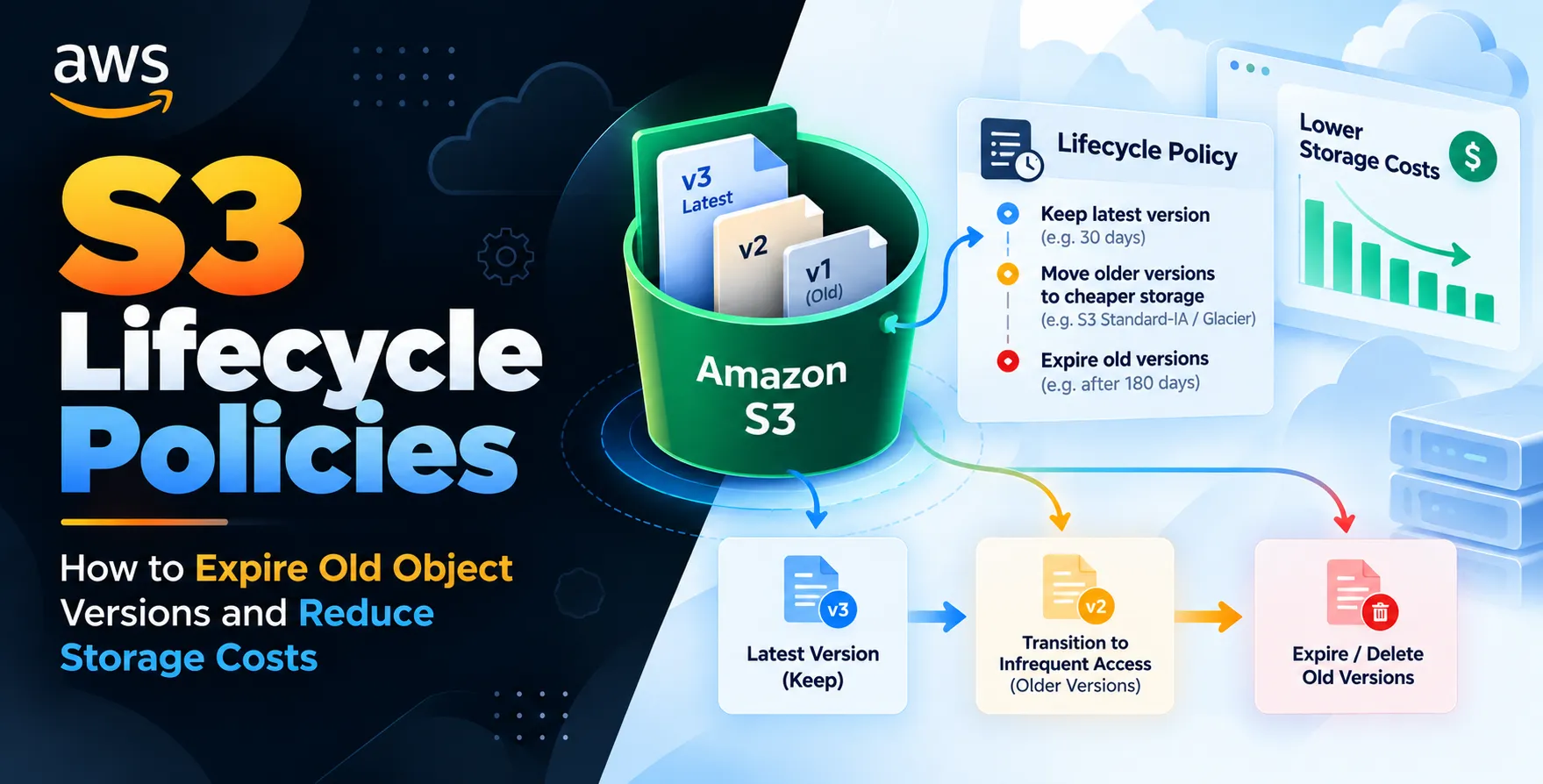
Implementing an Amazon S3 lifecycle policy is the most effective way to regain control over these growing storage footprints. By defining automated rules, you can ensure that data is deleted or transitioned to cheaper tiers after a set period. This proactive approach helps engineering teams maintain a lean infrastructure while ensuring data safety.
Understanding Amazon S3 Versioning
Versioning is a powerful feature that keeps multiple variants of an object in the same bucket. When you overwrite a file, S3 preserves the previous version instead of deleting it. This protects your data from being permanently lost due to simple human error or application bugs.
While this is great for data integrity, it is a silent cost driver for many companies. Every version is a distinct entity that consumes storage capacity and incurs monthly fees. If your application frequently updates files, your bucket size can explode rapidly.
- Prevents accidental data loss
- Maintains history for compliance
- Supports multiple object versions
- Requires explicit deletion to remove
Why Storage Costs Balloon Over Time
Cloud storage is often treated as an infinite resource by developers. When versioning is enabled, developers often forget that they are storing cumulative copies of every single binary, log file, or configuration asset pushed through a CI/CD pipeline. Over months or years, these ghost versions represent a significant portion of your bill.
This is where effective reduce S3 storage costs strategies become mandatory. Without automated intervention, you are essentially paying for data that has no business value. Engineers must treat storage as a finite, expensive resource that requires active management.
The Role of S3 Lifecycle Policies
Lifecycle policies allow you to transition objects to different storage classes or delete them entirely based on age or status. You define a set of rules that trigger automatically without any human interaction. This is the bedrock of modern cloud cost management.
Think of these policies as a janitor service for your storage infrastructure. You set the rules once, and the system handles the cleanup work in the background. It is a set-and-forget solution that scales perfectly as your data grows.
- Automated object expiration
- Transition to cheaper storage tiers
- Policy-based data management
- Zero operational overhead
Configuring S3 Noncurrent Version Expiration
The most critical step in managing bucket growth is mastering S3 noncurrent version expiration. This feature specifically targets older versions that are no longer the "current" version of the file. You can instruct AWS to delete these noncurrent versions after a specific number of days.
This approach ensures that you always keep the most recent version while shedding the accumulated weight of the past. It is the single most impactful setting for teams looking to optimize their storage expenses immediately.
Configuring via Console
The AWS Management Console provides a guided interface for creating these rules. You can filter by prefix or tag to apply rules to specific directories or projects.
- Select the bucket
- Go to management tab
- Create lifecycle rule
- Define expiration days
Configuring via CLI
Infrastructure as Code is preferred for consistent deployments across environments. Using the CLI allows you to version control your storage policies alongside your application code.
- Export policy to JSON
- Run put-bucket-lifecycle-configuration
- Validate status after execution
- Audit via deployment logs
By using the CLI, you ensure that your cleanup strategy is documented and reproducible. This consistency is vital for maintaining audit trails in regulated industries.
Automating Cleanup for Multipart Uploads
Many developers forget about incomplete multipart uploads that fail during the transfer process. These chunks still exist in your bucket and consume space even though they are technically not usable objects. They sit silently in the background racking up costs until you explicitly tell S3 to clean them up.
You should always configure an abort rule in your lifecycle policy. This ensures that failed uploads are purged after a few days, freeing up space automatically. It is a small change that yields immediate storage savings.
- Purge incomplete chunks
- Prevent wasted storage capacity
- Simplify bucket maintenance
- Clear hidden cost drivers
Best Practices for Cost Optimization
Cost management isn't just about deleting data; it's about making smart choices regarding where that data lives. You should combine deletion policies with transition policies to maximize efficiency.
For instance, you might move objects to Glacier after 30 days and then delete noncurrent versions after 90 days. This tiered strategy provides a safety net while keeping your standard storage costs low. Always start with conservative timelines to avoid accidental data loss.
| Strategy |
Action |
Cost Benefit |
| Immediate Expiration |
Delete after 7 days |
Highest |
| Tiered Transition |
Move to Glacier |
Moderate |
| Delayed Deletion |
Delete after 1 year |
Low |
Monitoring and Auditing Policies
Setting a policy is only half the battle. You need to monitor your storage metrics to ensure the policies are working as intended. AWS CloudWatch provides metrics that show you the total size of your buckets over time.
If you don't see a drop in your storage metrics after implementing a policy, investigate immediately. Check your filter rules to ensure they are actually matching the objects you intend to clean up. Regular audits prevent configuration drift and ensure your costs remain aligned with your business needs.
Comparing Manual vs Automated Cleanup
Manual cleanup is prone to human error and is rarely sustainable. Automation is the only way to manage large-scale cloud environments effectively. Relying on scripts is slightly better than manual work, but native S3 policies are superior in reliability and performance.
- Automation eliminates human error
- Native policies scale automatically
- Scripts require maintenance effort
- Policy logs provide audit trails
Impact on FinOps for Engineering Teams
Modern engineering teams are increasingly responsible for their own cloud spend. By managing their own storage lifecycles, developers gain a better understanding of the cost impact of their architectural choices. This creates a culture of accountability where resource efficiency is treated as a first-class citizen alongside performance and security.
When teams manage their own storage, they can make informed trade-offs between data retention and budget constraints. This autonomy is crucial for scaling agile teams that need to move fast without waiting for central IT approval.
Common Pitfalls to Avoid
One common mistake is applying a blanket policy to an entire bucket without considering the data inside. Some files might need to be kept for years due to regulatory requirements, while others are ephemeral. Always use prefixes or tags to segment your data before applying lifecycle rules.
Another issue is not testing the policy in a staging bucket first. A misconfigured policy could delete critical production data that you didn't intend to remove. Always verify your rules on non-production data before deploying them to your primary buckets.
Integration with Cloud Cost Allocation
Integrating your lifecycle management with cloud cost allocation tags allows for granular reporting. You can tag buckets or objects by project, team, or department. This enables you to see exactly which parts of your organization are generating the most storage waste.
When you have this level of visibility, you can hold specific teams accountable for their storage usage. It turns a technical task into a business-driven initiative, making it easier to justify the engineering time spent on optimization efforts.
Scaling Storage Policies Globally
As your application expands into multiple regions, your storage strategy must scale with it. You should use centralized configuration management to push consistent lifecycle policies to all buckets globally. This ensures that no matter where the data is stored, the same cost-saving rules are applied.
Consistency is key to managing a global cloud footprint. By standardizing your approach, you reduce the risk of "forgotten" buckets that continue to incur costs in obscure regions. Automation is the only way to keep pace with global infrastructure growth.
Conclusion
Managing S3 storage costs is an essential skill for any modern cloud developer. By leveraging lifecycle policies to expire old object versions, you can significantly reduce your monthly cloud spend without sacrificing data availability. Start by auditing your current bucket usage and identifying the biggest sources of noncurrent versions.
Once you implement these automated rules, your infrastructure becomes more efficient and cost-effective. Remember to monitor your progress and adjust your strategies as your data requirements evolve over time. With a solid foundation in place, you can focus on building features rather than worrying about your storage bill.


 In collaboration with