Table of Contents
- Introduction
- Understanding Kubernetes Health Probes
- The Role of Liveness Probes
- The Role of Readiness Probes
- The Role of Startup Probes
- Kubernetes Readiness vs Liveness Probe
- Best Practices for Probe Configuration
- Handling Slow-Starting Applications
- Common Pitfalls to Avoid
- Optimizing Probe Timing
- Integrating Probes with Deployment Strategies
- Ensuring High Availability
- Final Thoughts
Introduction
Managing containerized applications in production requires more than just launching pods. You need a reliable mechanism to ensure your services are actually running and ready to serve requests.
This is where Kubernetes health probes become essential for cluster stability. Properly configured probes prevent traffic from hitting broken instances and automate recovery.
Understanding Kubernetes Health Probes
Kubernetes health probes are the heart of self-healing infrastructure. They allow the kubelet to monitor the state of containers throughout their lifecycle.
By defining probes, you give Kubernetes the intelligence to act when things go wrong. Without them, the orchestrator has no visibility into your application's internal health.
- Automatic container restarts
- Controlled traffic routing
- Improved system reliability
- Proactive failure detection
The Role of Liveness Probes
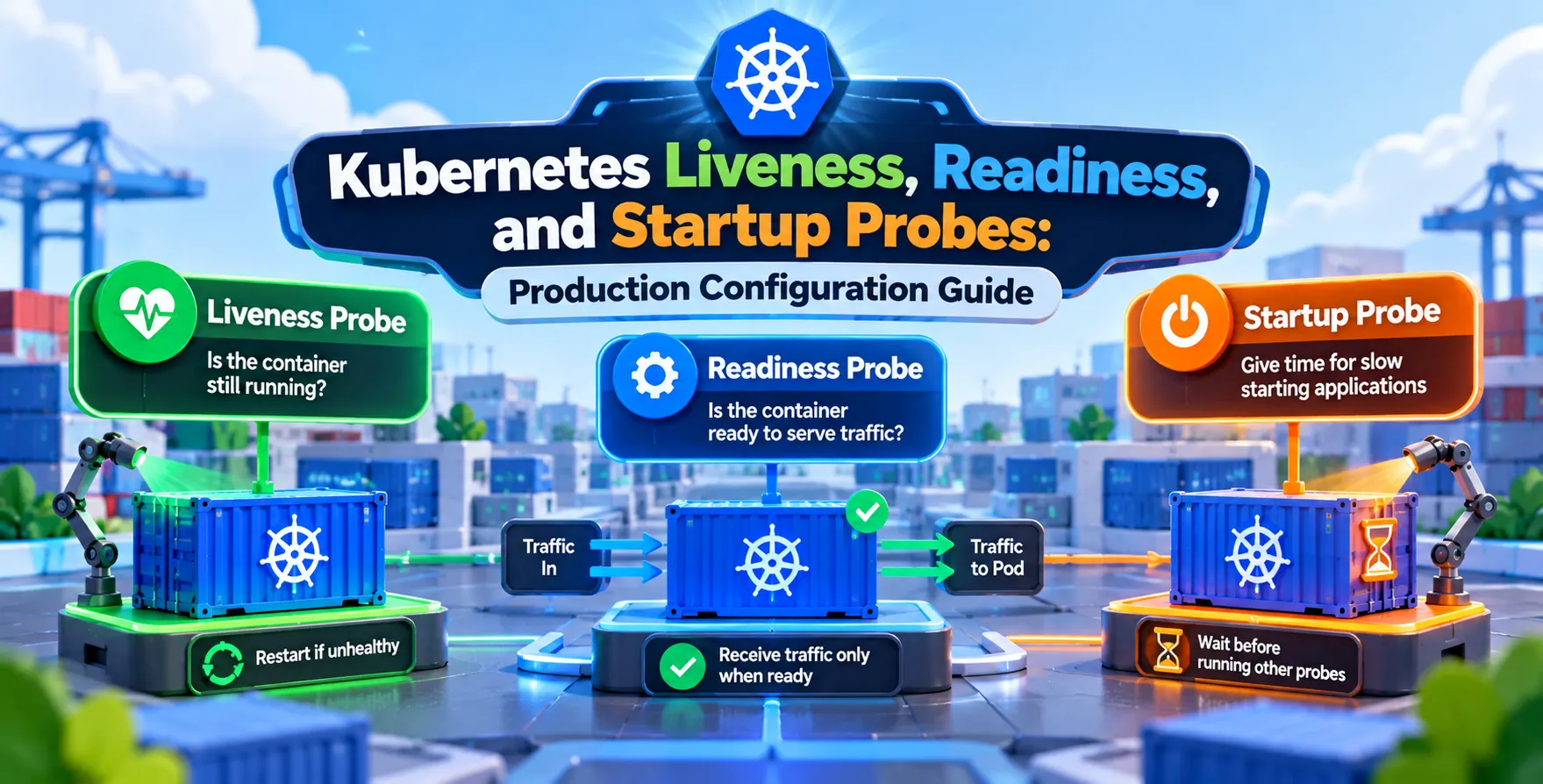
A liveness probe determines if your application is still running as expected. If the liveness check fails, Kubernetes kills the container and attempts to restart it.
This is particularly useful for detecting deadlocks or infinite loops where the process is active but non-functional. You should only use these to recover from states that require a fresh start.
- Detecting frozen application states
- Triggering automatic container restarts
- Cleaning up corrupted memory states
- Enforcing minimum service health
The Role of Readiness Probes
A readiness probe dictates whether your pod is prepared to accept incoming traffic. If the probe fails, the endpoint controller removes the pod from all service load balancers.
This ensures that users never hit an instance that is still loading heavy datasets or initializing connections. It acts as a safety gate for your traffic.
- Preventing premature traffic routing
- Managing initialization dependencies
- Handling temporary service outages
- Enforcing traffic flow control
The Role of Startup Probes
The Kubernetes startup probe configuration is designed for legacy or complex applications that take a long time to boot. It disables liveness and readiness checks until the application has successfully started.
Once the startup probe succeeds, the other probes take over the monitoring duties. This prevents premature restarts during long initialization phases.
- Supporting legacy application startup
- Protecting slow-booting services
- Delaying liveness monitoring
- Streamlining container initialization
Kubernetes Readiness vs Liveness Probe
| Feature |
Liveness Probe |
Readiness Probe |
| Primary Goal |
Restart broken containers |
Control traffic routing |
| Failure Action |
Kills and restarts pod |
Removes from services |
| Usage Scenario |
Deadlocks, hung processes |
Database connection issues |
| Impact on Traffic |
Drops current connections |
Traffic is diverted elsewhere |
| Recovery Method |
Container restart |
Pod becomes ready again |
Best Practices for Probe Configuration
Setting up your probes correctly involves balancing responsiveness with stability. Too aggressive settings can cause unnecessary restarts under minor load spikes.
Always ensure your health endpoints are lightweight and do not trigger heavy backend processing. A simple status code response is usually sufficient for most production environments.
- Keep endpoints lightweight
- Avoid heavy database queries
- Use appropriate failure thresholds
- Set reasonable initial delays
- Monitor probe failure rates
Handling Slow-Starting Applications
Many modern services rely on external dependencies that require time to establish. Using startup probes correctly prevents the dreaded crash loop backoff cycle.
If you don't use a startup probe, you often have to artificially inflate the liveness probe delay. This makes your system less responsive to actual failures later on.
Common Pitfalls to Avoid
One common mistake is configuring probes that perform too much work, essentially becoming a secondary workload. This can lead to resource exhaustion if your cluster is under heavy load.
Another issue is ignoring the failure threshold. You should allow for a few transient failures before taking drastic action on a pod.
- Overloading health endpoints
- Configuring probes too strictly
- Ignoring resource constraints
- Misusing liveness for readiness
- Hardcoding probe timeouts
Optimizing Probe Timing
Every application has a unique startup profile that dictates optimal timing. A Java application might need significantly more time to warm up than a Go binary.
You must tune your Kubernetes liveness readiness and startup probes production configuration guide settings based on real-world load testing. Monitor your logs to see how long your pods typically take to become fully operational.
Integrating Probes with Deployment Strategies
Probes are critical during any deployment process. When rolling out updates, readiness checks ensure the new version is functional before the old pods are terminated.
This mechanism is vital for maintaining uptime during updates. Without robust readiness checks, you risk serving errors to users during high-velocity deployments.
Ensuring High Availability
Achieving high availability requires careful coordination of all pod signals. Your probes work alongside other mechanisms to keep your services stable.
Consider how your probes interact with pod disruption budgets or autoscaling events. Proper health signals enable more accurate scaling decisions when using HPA or VPA metrics.
Final Thoughts
Properly configuring your probes is a foundational step in building production-ready Kubernetes environments. It transforms your infrastructure from a static runtime into a self-healing system.
Invest the time to profile your application startup and runtime behavior accurately. Well-tuned probes are the difference between a resilient system and one that requires constant manual intervention.


 In collaboration with