Table of Contents
- Introduction
- Understanding Voluntary Disruptions
- What is a Kubernetes PodDisruptionBudget?
- How PDBs Function in Practice
- Configuring Your First PDB
- MinAvailable vs MaxUnavailable
- Limitations of Pod Disruption Budgets
- Integrating PDBs with Deployment Strategies
- Monitoring and Debugging PDBs
- Best Practices for Cluster Stability
- PDBs and Autoscaling
- The Role of PDBs in Multi-Region Setups
- Final Thoughts
Introduction
In a dynamic cloud environment, running workloads on Kubernetes often feels like a balancing act. You need to perform routine node maintenance, update your infrastructure, or scale your resources without dropping traffic.
Without proper safeguards, these routine tasks can trigger accidental outages by killing too many pods at once. This is where Kubernetes Pod Disruption Budgets become essential for maintaining stability.
Understanding Voluntary Disruptions
Not all pod terminations are caused by application crashes or hardware failures. Many disruptions are voluntary actions taken by cluster administrators or automated systems to keep the environment healthy.
When these disruptions occur simultaneously across your replicas, your service availability can plummet. Understanding these triggers is the first step toward building a robust system.
- Node drains for OS patching
- Automated cluster upgrades
- Node autoscaling downscaling events
- Manual pod eviction requests
What is a Kubernetes PodDisruptionBudget?
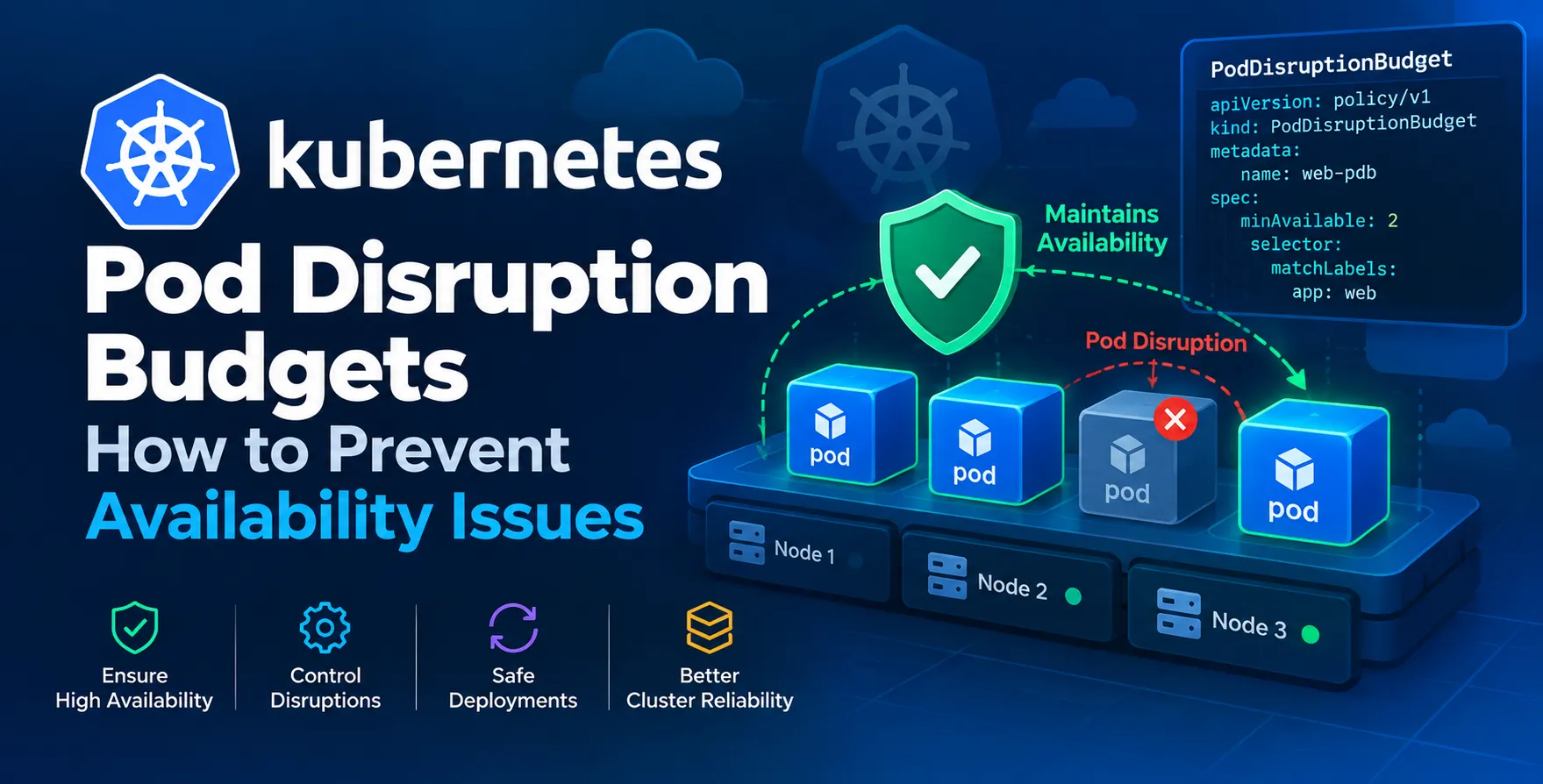
A Kubernetes PodDisruptionBudget is a specific resource designed to protect your application during voluntary disruptions. It acts as a safety contract between your application and the cluster orchestrator.
By defining a PDB, you explicitly tell the cluster how many replicas must remain running at all times. If a maintenance action would violate this budget, the Kubernetes API server will reject the eviction request until the target number of pods is restored.
This mechanism is vital for any team looking to learn how to prevent availability issues in highly volatile environments.
- Protects quorum-based applications
- Ensures minimum service capacity
- Prevents cascading failures
- Automates safety checks
How PDBs Function in Practice
When an eviction command is issued, the controller checks for any associated PDB objects. If a PDB exists for the pod's label selector, the system evaluates if evicting the pod will breach the defined threshold.
If the threshold is already met, the eviction request is queued or denied. This gives your application time to reschedule pods elsewhere or wait for the system to recover.
It essentially forces the cluster to respect your application's specific requirements for Kubernetes availability. It does not, however, protect against involuntary disruptions like node crashes or kernel panics.
- Evaluates current replica counts
- Checks against defined policies
- Rejects non-compliant eviction requests
Configuring Your First PDB
Setting up a PDB is straightforward. You define a manifest that uses a label selector to target your specific deployment or stateful set. You then specify either a percentage or an absolute number of pods that must stay online.
Always ensure your selectors match the labels on your pods exactly. A mismatch here will render the budget useless and leave your application vulnerable to unexpected downtime.
- Define labels matching your pods
- Set either minAvailable or maxUnavailable
- Apply the resource to the namespace
MinAvailable vs MaxUnavailable
Deciding between these two fields is the most critical part of your configuration. MinAvailable specifies the exact number of pods that must be ready at all times, which is great for ensuring a performance floor.
MaxUnavailable, on the other hand, defines the maximum number of pods that can be taken down during an operation. This approach is often more intuitive when you know your total replica count.
| Configuration |
Use Case |
Behavior |
| MinAvailable |
High-load services |
Ensures minimum capacity |
| MaxUnavailable |
Rolling updates |
Limits simultaneous restarts |
Limitations of Pod Disruption Budgets
While powerful, a Kubernetes PDB cannot solve every problem. It only applies to voluntary disruptions initiated by the API, meaning it does not guard against hardware failure or network partitions.
Furthermore, if your application does not have enough replicas, the PDB might block all maintenance indefinitely. You must maintain a healthy number of replicas for your budget to be effective.
- No protection against node crashes
- Requires multiple replicas to work
- Can block cluster upgrades if misconfigured
Integrating PDBs with Deployment Strategies
When you use advanced deployment strategies, your PDB works in tandem with your rollout plan. During a rolling update, the orchestrator respects both the update strategy and the PDB constraints.
This ensures that even during a CI/CD process, you maintain the required service levels. It is a key part of achieving zero-downtime releases in modern cloud architectures.
Monitoring and Debugging PDBs
Observing the health of your budgets is just as important as creating them. Use kubectl commands to check the status of your current disruption budgets and identify which ones are currently blocking evictions.
If you see a budget being frequently reached, it might indicate that your cluster is too small for your workload. You might need to look into Kubernetes autoscaling to ensure you have enough headroom to absorb these maintenance windows.
Best Practices for Cluster Stability
To keep your environment stable, always test your PDBs in a staging environment. Simulate a node drain and verify that your application remains reachable throughout the process.
Avoid setting overly strict budgets that make cluster management impossible. Always strive for a balance between high uptime and operational agility.
- Use absolute numbers for small clusters
- Use percentages for large-scale deployments
- Always label your pods correctly
- Audit PDBs during infrastructure reviews
- Combine with readiness probes
PDBs and Autoscaling
When using Kubernetes autoscaling, PDBs prevent the cluster autoscaler from removing nodes that host critical pods. Without a PDB, the autoscaler might terminate a node that is currently supporting your minimum required capacity.
This interaction is vital for maintaining a consistent performance level. Always ensure your PDBs are compatible with the scaling policies you have defined for your nodes.
The Role of PDBs in Multi-Region Setups
In a multi-region SaaS architecture, PDBs provide a localized layer of protection. They ensure that even if one region undergoes a coordinated maintenance event, the local capacity remains stable.
This adds another layer of defense-in-depth to your global infrastructure. When combined with traffic shifting at the ingress layer, you can achieve extremely high availability across your entire global footprint.
Final Thoughts
Managing cluster availability is a non-stop task that requires both automation and careful planning. By leveraging Pod Disruption Budgets, you create a safety net for your production workloads that survives routine maintenance and scaling events.
Invest the time to configure these budgets correctly based on your specific application needs. A little effort here prevents significant headaches down the road when your cluster needs to be updated or scaled.


 In collaboration with