Table of Contents
- Understanding Docker Layer Caching
- The Role of BuildKit in Performance
- Order Your Instructions for Efficiency
- Leveraging Multi-Stage Builds
- Using External Caches for CI Pipelines
- Minimizing Context Size
- Handling Dependencies Correctly
- Docker Build Cache Best Practices
- Optimizing Cache Invalidation
- Common Pitfalls to Avoid
- Measuring Build Performance
- Scaling Build Infrastructure
- Final Thoughts
Understanding Docker Layer Caching
Docker images are constructed using a series of layers. Each instruction in your Dockerfile, such as RUN or COPY, creates a new layer that acts as a snapshot of the filesystem.
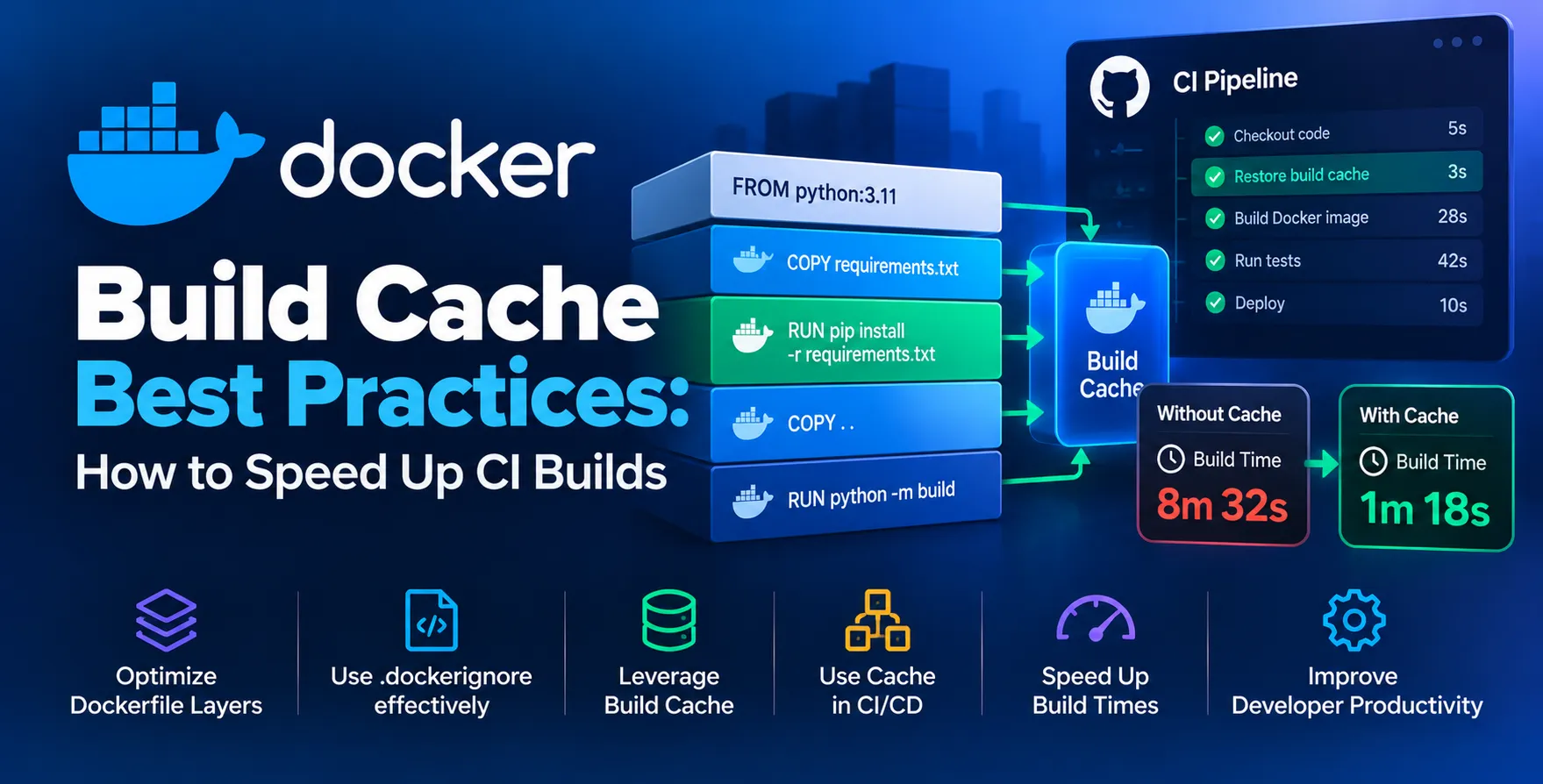
When you trigger a build, Docker checks if it already has a cached version of that specific layer. If the command and the context remain unchanged, Docker reuses the existing layer instead of running the command again.
This mechanism is the foundation of Docker CI/CD optimization. When your layers are cached correctly, you only rebuild the parts of your application that actually changed.
- Faster iteration cycles
- Reduced network bandwidth usage
- Lower infrastructure costs
- Consistent build environments
The Role of BuildKit in Performance
BuildKit is the modern engine behind Docker image builds. It provides significant improvements over the legacy builder, including parallel execution and better cache management.
By enabling BuildKit, you gain access to features like efficient cache mounting and concurrent instruction processing. Most modern Docker versions have this enabled by default, but verifying your configuration is crucial for performance.
It transforms how your containers are built, making the process smarter and more resilient to complex dependency trees. Using BuildKit cache effectively allows for more granular control over what gets saved and reused across multiple runs.
- Parallel build execution
- Advanced cache management
- Better error reporting
- Improved security features
- Support for remote cache backends
Order Your Instructions for Efficiency
The order of your Dockerfile instructions dictates how often your cache is invalidated. Docker invalidates the cache for a layer and all subsequent layers if any preceding layer changes.
You should always place instructions that change infrequently at the top of your file. These include installing system dependencies, updating base OS packages, or setting environment variables.
Instructions that change frequently, such as copying source code or running application tests, must be placed near the end. This ensures that the heavy installation steps remain cached as long as possible.
- Base image selection
- System package updates
- Application dependency installation
- Source code copying
- Application build processes
Leveraging Multi-Stage Builds
Multi-stage builds allow you to use different stages for building your application and running it. You can perform heavy compilation in one stage and copy only the final artifacts to a smaller production image.
This pattern significantly reduces the size of your final container while keeping your build environment clean. It also separates build-time dependencies from runtime requirements, which is a key aspect of secure deployment.
By isolating the build stage, you ensure that temporary files do not pollute your final production image. This approach also helps in maintaining cleaner caches by separating build logic from runtime configuration.
- Reduced final image size
- Separation of concerns
- Smaller attack surface
- Cleaner build environments
- Optimized dependency management
Using External Caches for CI Pipelines
In a standard CI environment, the build agent might be ephemeral, meaning local caches are wiped after every run. This makes standard caching ineffective for speeding up your pipelines.
To solve this, you can use external cache backends like registry caches or GitHub Actions cache. These services allow your build agents to push and pull cache data from a central location.
Implementing these solutions is essential when you want to achieve faster CI builds across distributed teams. It ensures that your developers do not have to wait for full rebuilds when simple code changes are pushed.
| Cache Strategy |
Local Build |
CI Pipeline |
| None |
Slow |
Very Slow |
| Layer Cache |
Fast |
Inconsistent |
| Remote Cache |
Fast |
Consistently Fast |
Minimizing Context Size
The Docker build context is the set of files sent to the daemon during the build process. If your context includes unnecessary files, the build process slows down significantly.
Using a .dockerignore file is the most effective way to manage your context. It prevents large logs, virtual environments, or hidden git directories from being sent to the builder.
Keeping your context small reduces the overhead of transferring data. This is particularly important when working with remote build nodes or cloud-based deployment services.
- Exclude local logs
- Ignore git history
- Remove node_modules
- Strip test data
- Exclude IDE settings
Handling Dependencies Correctly
Installing dependencies is often the most time-consuming part of a build. You should copy only your dependency manifest files before running the installation command.
By copying package.json or requirements.txt separately, Docker can cache the result of your dependency installation. Subsequent builds will skip the installation step unless your dependency file changes.
This technique is a cornerstone of effective Docker CI/CD optimization. It prevents unnecessary downloads of heavy libraries whenever you modify a small piece of application code.
- Copy manifest files first
- Install dependencies
- Copy application source code
- Run build scripts
- Verify environment consistency
Docker Build Cache Best Practices
Consistently applying these best practices will transform your development workflow. Focus on maintaining a clean Dockerfile that follows the layer-based philosophy of Docker.
Regularly audit your Dockerfiles to remove redundant steps or inefficient patterns. A well-optimized build process saves developers time and reduces the load on your CI infrastructure.
Remember that caching is a tool, not a magic solution. Always ensure your build is deterministic so that caching does not mask underlying issues or inconsistent results.
- Keep layers small
- Use specific base image versions
- Avoid unnecessary command chaining
- Maintain deterministic builds
- Clean up temporary files
Optimizing Cache Invalidation
Sometimes you need to force a cache refresh, for example, when updating system packages. You can achieve this by using build arguments that change with every build.
However, be cautious not to overuse this technique, as it defeats the purpose of caching. Use it only when you explicitly need to bypass the cache for specific layers.
Understanding how Docker identifies changes is key. It compares the instruction string and the contents of the files being copied to determine if a cache hit occurred.
- Use build-time arguments
- Update base images
- Reset cache manually
Common Pitfalls to Avoid
Even with good intentions, developers often fall into traps that break caching. One common mistake is using commands that generate non-deterministic output, like current timestamps or random values.
Another issue is chaining too many unrelated commands into a single RUN instruction. This makes it impossible to cache individual steps of the process.
Always aim for granularity in your Dockerfile. Clear, modular instructions are easier to debug and cache effectively.
- Avoid dynamic timestamps
- Don't chain unrelated tasks
- Prevent frequent cache busting
- Keep instructions focused
Measuring Build Performance
You cannot improve what you do not measure. Use tools to track how long each build takes and how many cache hits you are achieving.
Many CI platforms provide timing logs for each step. Analyzing these logs can reveal bottlenecks where caching is failing unexpectedly.
Set a baseline for your build times and track improvements over time. This helps you justify the effort spent on optimizing your containerization strategy.
- Track build duration
- Monitor cache hit rates
- Audit step-by-step logs
- Compare across environments
Scaling Build Infrastructure
As your team grows, the demand on your CI system increases. Scaling your infrastructure requires more than just adding more hardware; it requires smarter build strategies.
Utilizing remote cache backends becomes mandatory in large-scale environments. It ensures that all developers and CI runners share the same cache state.
By focusing on efficient container construction, you enable your team to ship faster and more reliably. Proper caching is not just a performance tweak; it is a core component of professional software delivery.
- Deploy distributed build nodes
- Implement remote cache sharing
- Automate build performance audits
Final Thoughts
Speeding up your CI/CD pipelines is a constant effort. By mastering Docker build cache best practices, you can dramatically improve the developer experience and reduce wait times.
Take the time to analyze your current build process and identify where caching is failing. Small changes in your Dockerfile order or context management can lead to significant time savings.
Focus on building an environment that supports rapid iteration. Efficient builds are the backbone of modern software engineering teams.
- Prioritize developer feedback loops
- Optimize for consistency
- Maintain clean Dockerfiles


 In collaboration with