Table of Contents
- Introduction to Secure Cloud Deployments
- The Problem with Long-Lived Credentials
- How GitHub Actions OIDC Works
- Setting Up IAM Roles for OIDC
- Configuring GitHub Actions for AWS
- Why Keyless Authentication Matters
- Implementing Security Best Practices
- Comparing Static Keys vs OIDC
- Handling Multi-Account Deployments
- Troubleshooting Common OIDC Errors
- Integration with Infrastructure as Code
- Maintaining Secure CI/CD Pipelines
- Final Thoughts
Introduction to Secure Cloud Deployments
Modern cloud environments demand a higher standard of security than ever before. Managing secrets within CI/CD pipelines has historically been a major pain point for engineering teams.
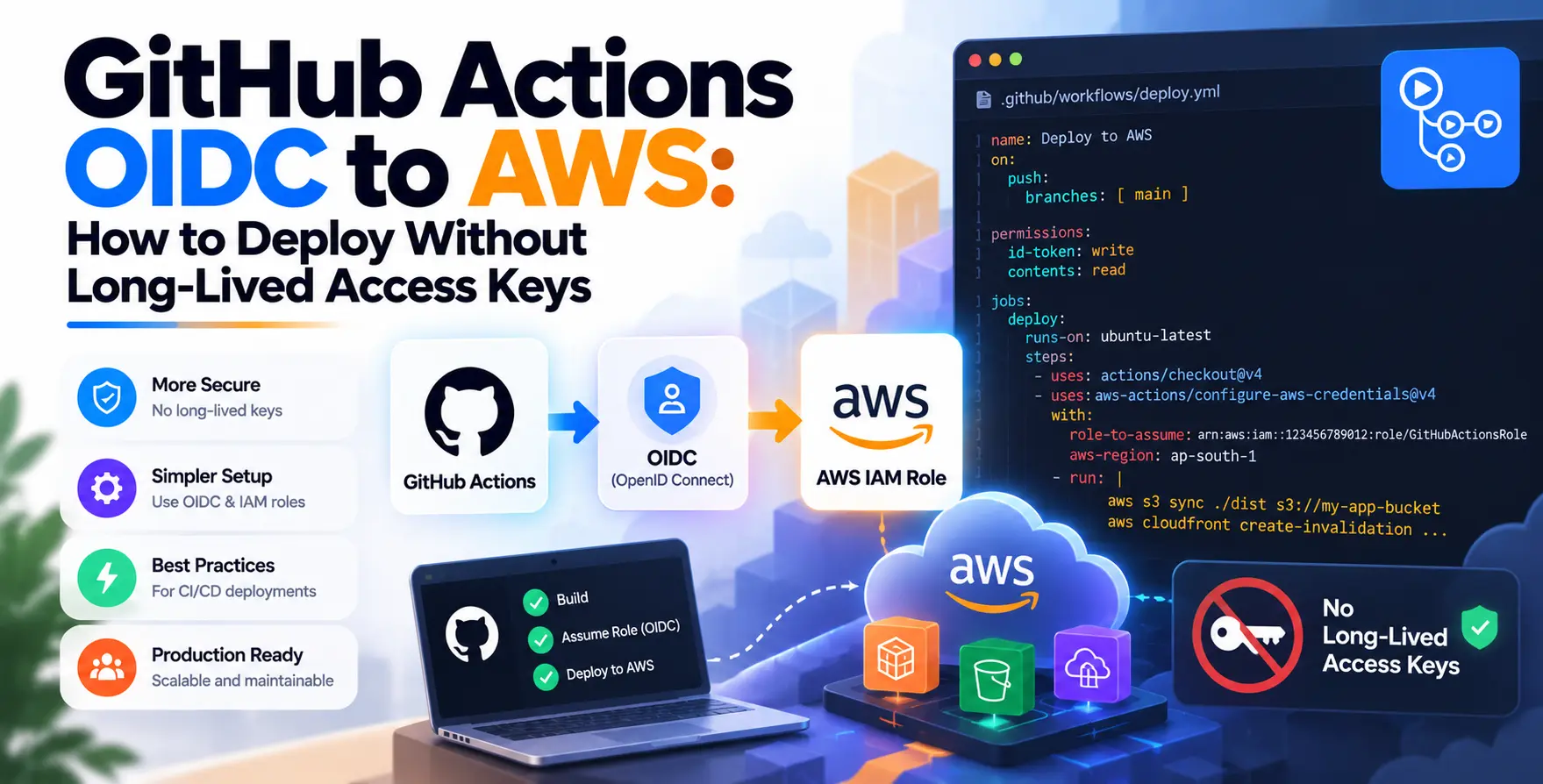
By leveraging GitHub Actions OIDC to AWS how to deploy without long-lived access keys, developers can eliminate static credentials entirely. This approach shifts the security model from shared, permanent secrets to temporary, dynamic tokens.
The Problem with Long-Lived Credentials
Static IAM access keys are dangerous because they persist indefinitely unless manually rotated. If a developer accidentally commits these keys to a version control system, the security of your entire cloud infrastructure is compromised.
Even with strict secret management, long-lived keys create a massive blast radius. If a single key is leaked, an attacker can access your resources until the secret is revoked.
- Increased risk of accidental exposure
- Administrative burden of secret rotation
- Difficulty tracking individual usage patterns
- High impact of credential leakage
How GitHub Actions OIDC Works
The core concept of OpenID Connect is to replace static secrets with short-lived, trust-based authentication. When a GitHub Actions workflow runs, it requests a JSON Web Token from GitHub.
This token is then presented to AWS. AWS validates the token against the trusted OIDC provider configuration to ensure the request is legitimate and comes from a specific repository.
Once validated, AWS issues a temporary security token to the workflow. This token automatically expires after the job finishes, ensuring the credentials cannot be reused later.
Setting Up IAM Roles for OIDC
To begin your GitHub OIDC AWS deployment, you must first create an identity provider in your AWS console. This tells AWS to trust GitHub as a legitimate source of authentication.
Configuring the Identity Provider
You need to point the provider to the GitHub OIDC discovery URL. This allows AWS to retrieve the public keys needed to verify incoming tokens.
- Set URL to token.actions.githubusercontent.com
- Set Audience to sts.amazonaws.com
- Add thumbprint for the GitHub CA
Once the provider exists, you create an IAM role with a trust policy that restricts access. This policy ensures only your specific GitHub repository can assume the role.
Configuring GitHub Actions for AWS
After your IAM role is ready, you must configure your workflow files to request the token. The official AWS action handles most of this logic automatically.
Workflow Requirements
You need to provide specific permissions in your YAML file to allow the workflow to generate an OIDC token. Without these permissions, the request will fail immediately.
- Specify the permissions block
- Set id-token to write
- Set contents to read
By defining these permissions, you ensure your pipeline stays secure while performing legitimate cloud operations. This is a critical step for any keyless CI/CD AWS setup.
Why Keyless Authentication Matters
Moving toward keyless CI/CD AWS workflows is a fundamental shift in DevOps maturity. It removes the human error factor associated with manual secret management.
Developers no longer need to worry about the lifecycle of their access keys. The platform handles the generation and expiration of tokens behind the scenes.
This reduces operational overhead significantly. Teams can focus on shipping features rather than managing rotation policies for every service account.
Implementing Security Best Practices
Security is not just about the mechanism, but also about the policy. Always follow the principle of least privilege when defining your IAM roles.
Limit the permissions of the role assumed by GitHub Actions to only what is necessary. If your pipeline only needs to deploy S3 buckets, do not grant it full administrative access.
- Apply least privilege policies
- Use condition keys for repository filtering
- Regularly audit IAM trust policies
- Monitor token usage with CloudTrail
Comparing Static Keys vs OIDC
| Feature |
Static Keys |
OIDC Tokens |
| Rotation |
Manual required |
Automatic |
| Expiration |
Indefinite |
Short-lived |
| Risk Level |
High |
Low |
| Management |
Complex |
Simplified |
Handling Multi-Account Deployments
Large organizations often spread workloads across multiple AWS accounts. OIDC allows you to manage this complexity by assuming different roles based on the environment.
You can configure your GitHub workflow to assume a specific role in a production account while using a different role for staging. This keeps your environments isolated and secure.
This pattern is highly effective for teams practicing infrastructure as code best practices with Terraform. You can define your deployment target in the CI/CD pipeline dynamically.
Troubleshooting Common OIDC Errors
Even with a perfect setup, you might encounter issues during the initial implementation. Most errors stem from misconfigured trust policies or missing permissions.
Common Debugging Steps
If your job fails, check the GitHub logs for specific OIDC error messages. These messages usually indicate exactly which part of the validation failed.
- Verify the repository name matches
- Check the OIDC provider URL
- Ensure the audience claim matches
- Review IAM trust policy syntax
Always ensure your IAM role name matches exactly what is referenced in your workflow file. Small typos are a common source of frustration during the setup phase.
Integration with Infrastructure as Code
Integrating OIDC with tools like Terraform makes your deployment strategy much more robust. When you run Terraform from GitHub, it uses the OIDC token to authenticate with AWS APIs.
This allows you to manage your infrastructure securely without ever passing secrets to the Terraform process. It creates a seamless link between your code repositories and your cloud resources.
This setup is essential for teams aiming to standardize their GitOps infrastructure management. It ensures that every change to your infrastructure is authenticated and logged properly.
Maintaining Secure CI/CD Pipelines
A secure pipeline is a continuous process, not a one-time setup. Regularly review your IAM policies and ensure no overly broad permissions have been added over time.
Monitor your AWS CloudTrail logs to see which roles are being assumed and by whom. This helps you maintain visibility into your automated deployment pipeline activities.
Stay updated with the latest security recommendations from both GitHub and AWS. As the landscape evolves, new features or security requirements may emerge for your GitHub Actions OIDC AWS integration.
Final Thoughts
Transitioning to OIDC for your cloud deployments is one of the most effective ways to improve your security posture. By removing long-lived keys, you eliminate a major attack vector and simplify your secret management.
While the initial setup requires careful configuration, the long-term benefits are substantial. Your CI/CD pipelines will be more resilient, secure, and easier to manage as your infrastructure grows.


 In collaboration with