Table of Contents
- Introduction
- Understanding Connection Overhead
- Why You Need Connection Pooling
- The Role of PgBouncer
- Installing PgBouncer
- Key Configuration Parameters
- Transaction vs Session Pooling
- Setting Up Authentication
- Monitoring Connection Health
- Managing High Concurrency Patterns
- Performance Tuning Tips
- Avoiding Common Misconfigurations
- Deployment Considerations
- Final Thoughts
Introduction
Managing database connections efficiently is critical for any high-performance application. As your user base grows, the default process-per-connection model in Postgres begins to show its limitations.
Without a proper strategy, your database server will quickly run out of memory or CPU cycles. Implementing a robust connection pooling solution is often the most impactful step toward maintaining stability.
Understanding Connection Overhead
PostgreSQL uses a process-based architecture where each client connection spawns a new server process. This design is robust but consumes significant memory per connection.
When your application creates and destroys connections frequently, the overhead of forking processes becomes a bottleneck. This is especially true for modern web applications that handle bursts of traffic.
Resource Consumption Factors
Several factors contribute to the resource drain on your database server when connections are not managed effectively.
- Memory allocation per process
- CPU context switching overhead
- Cleanup time for terminated sessions
- Lock contention during startup
Understanding these factors is essential before diving into the specifics of how to configure PostgreSQL connection pooling with PgBouncer.
Why You Need Connection Pooling
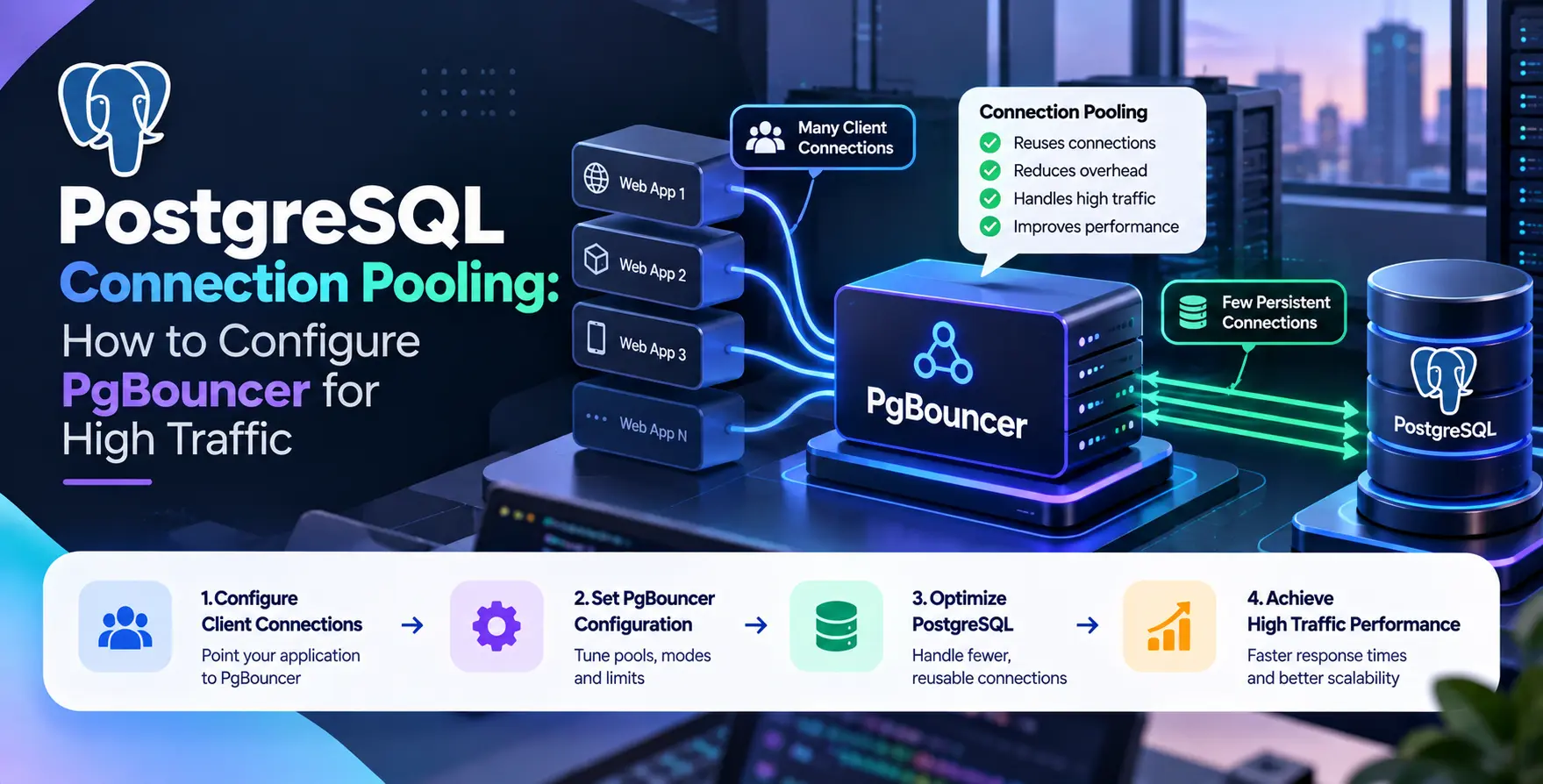
Connection pooling acts as a buffer between your application and the database. Instead of opening new connections, your application requests an existing, idle connection from the pool.
This drastically reduces the time and resources spent on connection handshakes. It is a fundamental requirement for achieving Postgres high concurrency in production environments.
By maintaining a steady set of connections, you ensure that the database server remains predictable. This stability allows you to focus on other aspects like query performance or PostgreSQL indexing best practices for web applications.
The Role of PgBouncer
PgBouncer is a lightweight, specialized connection pooler designed specifically for PostgreSQL. It sits between the client and the database to manage a pool of connections.
It is incredibly efficient because it uses an event-based architecture rather than a process-based one. This allows it to handle thousands of incoming client requests with minimal overhead.
Installing PgBouncer
Installation depends largely on your operating system and deployment environment. Most Linux distributions include it in their standard package repositories.
You can typically install it using your system's package manager. For complex infrastructure, you might prefer running it inside a container alongside your application stack.
- Update your package repository lists
- Install via apt, yum, or dnf
- Verify the installation binary location
Once installed, the configuration files are usually located in /etc/pgbouncer/pgbouncer.ini. This is where you will define your database connections and pool settings.
Key Configuration Parameters
The PgBouncer configuration file is where the magic happens. You must define your databases, users, and general pool settings carefully to match your server capacity.
Start by configuring the [databases] section to point to your actual Postgres host. You should also define the [pgbouncer] section to control how the pooler behaves under load.
- pool_mode
- max_client_conn
- default_pool_size
- reserve_pool_size
- auth_file
Properly setting these values ensures that your application never overwhelms the database. Misconfigured pools often lead to connection timeouts or authentication errors.
Transaction vs Session Pooling
Choosing the right pooling mode is a critical decision during your PgBouncer configuration. The mode determines how long a connection is held by a client.
Session Pooling
In session mode, a connection is assigned to a client for the entire duration of the session. This is the simplest mode but does not solve the scaling issues caused by idle connections.
- Maintains state between queries
- Supports all Postgres features
- Uses one pool slot per client
Session pooling is useful if your application heavily relies on prepared statements or session-level variables.
Transaction Pooling
Transaction mode is the most scalable option for high-traffic applications. It releases the connection back to the pool as soon as the transaction finishes.
- Maximizes database throughput
- Reuses connections aggressively
- Requires careful state management
Most modern web frameworks work well with transaction pooling. It effectively decouples the application connection count from the database process count.
Setting Up Authentication
Security is just as important as performance. PgBouncer requires an authentication file to verify incoming connections from your application servers.
You can use a simple text file or a query-based method to fetch credentials. Ensure the permissions on this file are restricted so only the user running the process can read it.
If you are using custom software development practices for your internal tools, integrate this with your central identity management. This keeps your database credentials consistent across your environments.
Monitoring Connection Health
Monitoring is vital to ensure your pooler is actually helping. You should track the number of active, waiting, and idle connections in the pool.
PgBouncer provides an administrative interface that you can query using standard SQL commands. You can connect to the internal pg_bouncer database to view real-time statistics about your traffic.
- Monitor queue depths
- Check transaction latency
- Review connection churn rates
If you see a high number of waiting connections, it is a clear signal that your pool size is too small. Increase the size gradually while watching the impact on database CPU usage.
Managing High Concurrency Patterns
When you have extreme spikes in traffic, you might need to adjust your strategy further. Start by ensuring your application code is optimized to release connections quickly.
Avoid long-running transactions that hold connections open unnecessarily. These are the primary enemies of effective PostgreSQL connection pooling.
If you are using microservices, consider deploying multiple instances of PgBouncer. This distributes the load and provides redundancy if one pooler instance fails.
Performance Tuning Tips
Tuning is an iterative process. You should start with conservative numbers and adjust based on actual performance metrics observed in production.
Check if your database queries are efficient. Sometimes, the bottleneck is not the connection pool but slow queries that hold connections for too long. In these cases, focus on optimizing your SQL instead.
| Metric |
Target Strategy |
Benefit |
| Max connections |
Match DB capacity |
Prevent crashes |
| Pool size |
Start small |
Reduce memory usage |
| Timeout |
Low values |
Faster error recovery |
| Server idle |
Moderate |
Reduced handshake cost |
Avoiding Common Misconfigurations
One common mistake is setting the pool size too high. If the pool size exceeds the database's ability to process concurrent queries, you will experience thrashing.
Another error is failing to set a reserve pool size. This causes issues when the main pool becomes saturated, leaving no room for quick, short-lived tasks.
- Ignoring server limits
- Mismanaging auth files
- Using session mode incorrectly
- Overlooking log file errors
Always review your logs after making configuration changes. PgBouncer is very descriptive when it encounters issues with connectivity or authentication.
Deployment Considerations
When you are ready for deployment, ensure your CI/CD pipeline includes tests for database connectivity. This prevents configuration errors from reaching production during a deployment.
Consider where your pooler lives in relation to your application. Placing it on the same host as the application often provides the lowest latency for connection requests.
If you are using containerized environments, ensure your orchestration layer manages the lifecycle of the pooler process correctly. This is part of maintaining a healthy and resilient infrastructure.
Final Thoughts
Implementing a connection pooler is a transformative step for any growing application. It allows you to move beyond the limitations of standard Postgres connection handling.
By focusing on proper configuration and monitoring, you can achieve the high concurrency required by modern systems. Start by auditing your current connection usage and see where improvements can be made.


 In collaboration with