Table of Contents
- Introduction to Feature Management
- Understanding Feature Flags
- The Core Benefits of Feature Flags
- Developing a Solid Feature Flag Strategy
- Managing the Lifecycle of Flags
- Security and Compliance Considerations
- Avoiding Common Implementation Pitfalls
- Feature Flags in Modern CI/CD
- Testing and Quality Assurance
- Communication Across Teams
- Technical Debt and Cleanup Protocols
- Comparing Toggle Types
- Scaling Flags in Distributed Systems
- Conclusion
Introduction to Feature Management
Modern software delivery requires speed without sacrificing stability. SaaS teams often struggle to balance rapid iteration with the need for a seamless user experience.
This is where feature flags become essential for development workflows. By decoupling deployment from release, teams can push code safely and activate features only when ready.
Understanding Feature Flags
At their core, these tools are simple conditional statements in your codebase. They allow you to toggle functionality on or off for specific users or environments without redeploying your application.
This capability transforms how teams approach SaaS feature management. Instead of massive, risky code merges, you move to small, incremental updates that can be toggled if something breaks.
- Toggle features in real-time
- Enable canary releases for users
- Separate code deployment from feature release
- Simplify rollback procedures during incidents
The Core Benefits of Feature Flags
Implementing these controls provides immediate advantages for product velocity. You gain the ability to test in production environments without exposing unfinished work to your entire user base.
This approach significantly reduces the pressure on engineering teams during high-stakes launches. If an issue arises, disabling a feature takes seconds rather than requiring a full rollback or hotfix.
- Faster deployment cycles
- Reduced risk during releases
- Improved feedback loops
- Enhanced experimentation capability
Developing a Solid Feature Flag Strategy
A robust feature flag strategy requires clear guidelines on who manages flags and when they get removed. Without governance, you risk creating a tangled mess of conditional logic that is impossible to maintain.
Standardize your naming conventions early to ensure developers understand the purpose of every flag in the system. Documentation should be as vital as the code itself.
Naming Conventions
Consistent names help teams navigate complex systems. Each flag should clearly indicate its purpose and target audience.
- Use descriptive prefixes for teams
- Include the feature name clearly
- Specify the target environment
- Avoid ambiguous or vague labels
Approval Workflows
Not every developer should have the power to flip production switches. Implement clear workflows to ensure accountability.
- Require peer review for flags
- Define clear owners for toggles
- Document the expected outcome
- Set expiration dates for flags
Managing the Lifecycle of Flags
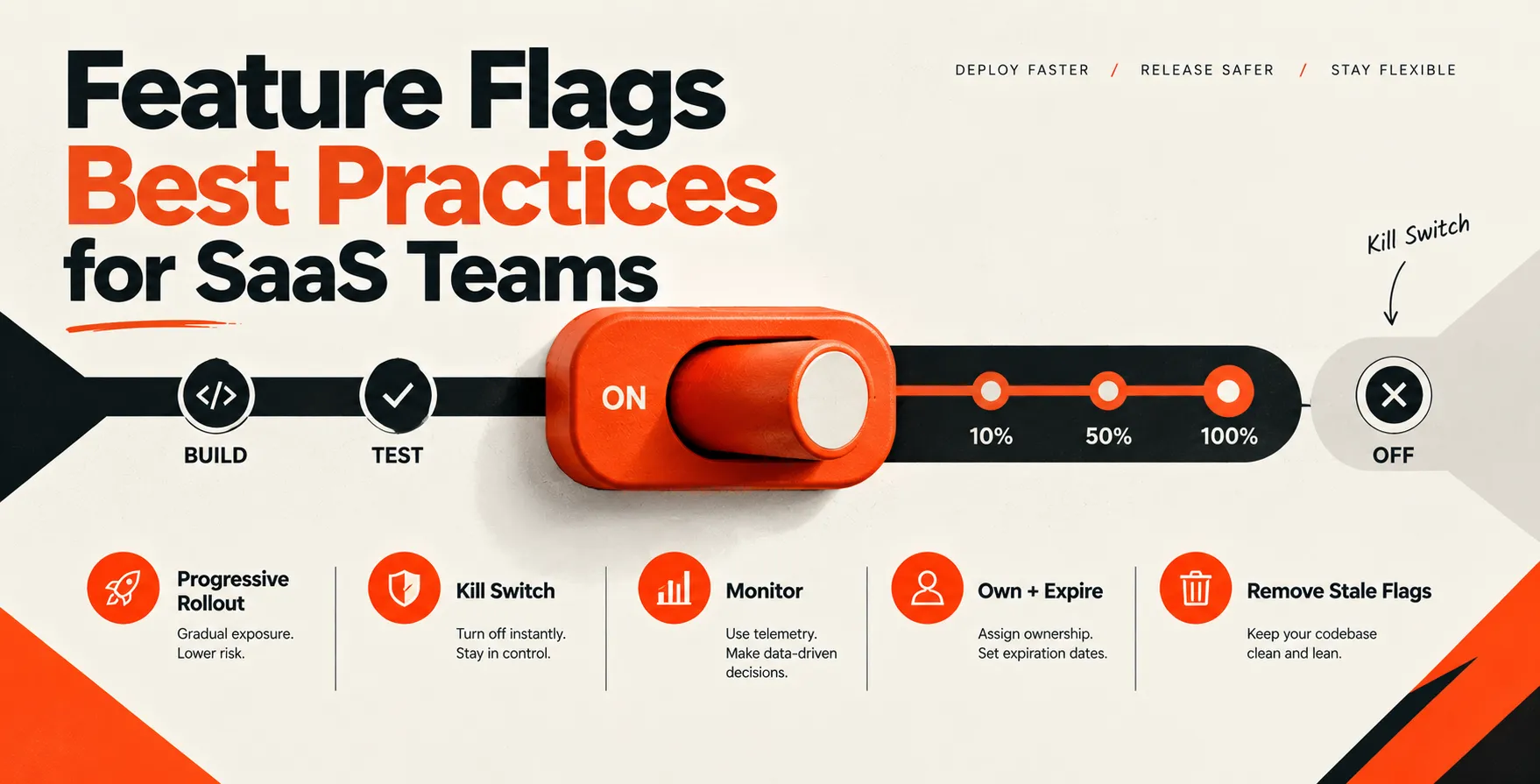
Feature flags are not meant to live forever in your codebase. They are temporary tools that must be treated as technical debt once their purpose is served.
Assign a lifecycle status to every flag you create. When a feature is fully rolled out, prioritize the removal of the corresponding flag in the next sprint.
Security and Compliance Considerations
Security teams often worry about the potential for unauthorized access to toggled features. You must restrict who can modify flags in your management dashboard.
Audit logs are mandatory for any enterprise-grade implementation. You need to know exactly who toggled a feature and when that change occurred.
- Restrict dashboard access by role
- Maintain comprehensive audit trails
- Encrypt configuration data in transit
- Verify flag state before deployment
Avoiding Common Implementation Pitfalls
One of the biggest mistakes teams make is keeping flags too long. This creates a cluttered codebase that is difficult to test and debug.
Over-engineering your flag logic is another risk. Keep your implementation clean and avoid nesting too many conditional checks within your core business logic.
| Practice |
Traditional Approach |
Best Practice |
| Cleanup |
Ignored indefinitely |
Automated removal sprints |
| Visibility |
Hardcoded config files |
Centralized management dashboard |
| Scope |
Global toggles |
User-specific targeting |
| Testing |
Manual verification |
Automated flag validation |
Feature Flags in Modern CI/CD
Integrating flags into your CI/CD pipeline API testing routines ensures that your application behaves correctly regardless of the feature state. Never deploy a code change without verifying that the toggle logic is sound.
Automation is the key to maintaining velocity. When your pipeline runs, it should validate that all toggle permutations remain functional.
Testing and Quality Assurance
Comprehensive testing & qa services should include specific scenarios for both enabled and disabled flag states. You cannot assume that disabling a feature will gracefully handle all edge cases.
Automated regression tests must cover multiple configurations to prevent unexpected side effects. This is particularly important when working with complex microservices where a toggle might affect multiple downstream dependencies.
Communication Across Teams
Technical teams and product managers must align on the status of every feature. If a feature is toggled, customer support must be informed immediately to handle potential inquiries.
Use shared dashboards that visualize current system state. Transparency prevents confusion when a specific user segment suddenly gains access to a new tool.
Technical Debt and Cleanup Protocols
View every flag as a loan from the future that requires repayment. If you leave too many flags in your application, you will eventually face significant performance overhead and maintenance hurdles.
Schedule regular cleanup days where your engineering team focuses solely on removing stale flags. This keeps the codebase lean and minimizes the risk of accidental feature activation.
Comparing Toggle Types
Understanding the different categories of flags helps in choosing the right tool for the job. Release toggles are for shipping, while experiment toggles help with A/B testing.
- Release toggles for deployment
- Experiment toggles for product testing
- Ops toggles for system stability
- Permission toggles for feature access
Scaling Flags in Distributed Systems
When your architecture grows, managing state across multiple services becomes a challenge. You need a centralized service to broadcast flag states to all instances instantly.
Latency is a concern in distributed environments. Ensure that your flag evaluation occurs locally within the service to prevent network calls from slowing down critical requests.
Conclusion
Adopting feature flags best practices for SaaS is a journey rather than a one-time setup. It requires discipline, clear communication, and a commitment to maintaining a clean codebase over time.
By prioritizing the removal of stale toggles and focusing on secure, transparent management, you enable your team to innovate faster. Start small, document everything, and continuously iterate on your internal processes for long-term success.


 In collaboration with