Table of Contents
- Introduction to Audit Logging
- Defining the Audit Log Schema
- Handling Multi-Tenancy in Logs
- Core Fields for Audit Events
- Storage and Retention Strategies
- Implementing Access Controls
- Ensuring Data Integrity
- Audit Log Performance Considerations
- Integration with Observability Tools
- Security and Compliance Standards
- Challenges in Scaling Audit Trails
- Best Practices for Audit Log Management
- Conclusion
Introduction to Audit Logging
Audit logging is a fundamental requirement for any serious enterprise application. It provides the historical record needed to reconstruct events, troubleshoot issues, and meet regulatory requirements.
For developers, implementing a reliable system for SaaS audit logging is not just about writing logs to a file. It involves building a structured, secure, and searchable trail of every significant action taken within the platform.
Defining the Audit Log Schema
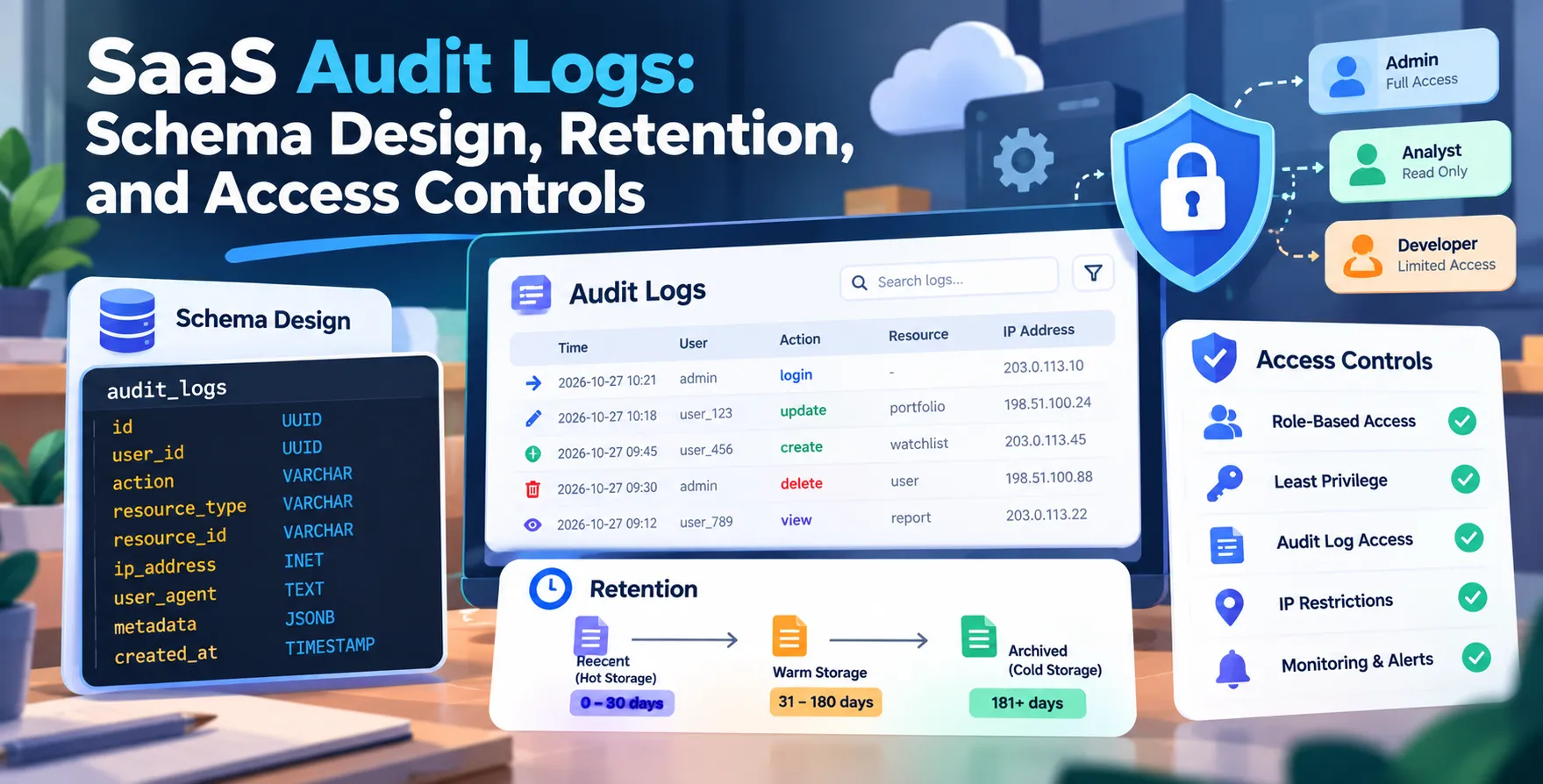
A well-defined schema is the backbone of an effective enterprise application audit trail. Without consistency, logs become impossible to query or analyze when an incident occurs.
Your schema should be structured to capture the who, what, when, and where of every action. This structure allows security teams to build automated alerts based on suspicious patterns.
- Event timestamp in UTC
- Actor identifier or user ID
- Action performed by the user
- Resource type being accessed
- Target resource unique identifier
- Outcome of the request
Handling Multi-Tenancy in Logs
Building a robust multi-tenant audit log schema requires careful isolation of data. In a multi-tenant environment, you must ensure that one customer cannot see the logs of another.
You need to embed tenant-specific identifiers directly into the log structure. This approach makes it trivial to filter logs for a specific customer or support request.
Logical Partitioning
You can partition logs by tenant ID to improve query performance. This ensures that analytical queries do not scan unnecessary data.
- Logical separation at the database level
- Tenant ID as a required field
- Strict scoping for API queries
- Isolation of log storage buckets
Data Isolation
Data isolation is critical for security. Ensure that your logging pipeline enforces tenant context at every stage of the lifecycle.
- Encrypted tenant data streams
- Granular access control policies
Core Fields for Audit Events
Every audit entry needs a standard set of metadata to be useful for forensics. Think of your logs as a database table that needs to remain readable for years.
Include enough context in each entry so that a developer can understand exactly what happened months later. Vague descriptions like "User updated data" are often useless during an investigation.
- Request IP address
- User agent strings
- Session identifiers
- Correlation IDs for tracing
- Previous and new values
Storage and Retention Strategies
Storage costs can escalate quickly when you log every single interaction. Defining a clear retention policy is essential to keep your infrastructure costs predictable.
You might keep hot data in a database for quick searching, while moving older data to cold storage for compliance purposes. Automated lifecycle policies should handle the transition between these storage tiers.
- Short-term hot storage for active debugging
- Long-term cold storage for regulatory compliance
- Periodic data archiving and compression
- Automatic deletion of expired logs
- Version control for log formats
Implementing Access Controls
Audit logs are high-value targets for attackers. If an attacker gains access to your logs, they can hide their footprints or steal sensitive information.
Apply the principle of least privilege to your logging infrastructure. Only administrators or automated security tools should have write or read access to the master log store.
- Restrict read access to audit logs
- Enable multi-factor authentication for log access
- Audit the access logs of the audit system
- Rotate keys for encrypted log storage
Ensuring Data Integrity
Immutable logs are the gold standard for security. Once an event is written, it should be impossible to modify or delete that record, even by an administrator.
Cryptographic hashing can help verify the integrity of your log files. By chaining hashes, you can detect if any log entry has been tampered with or removed.
Audit Log Performance Considerations
Writing logs should never block your main application threads. Use asynchronous logging patterns to minimize latency for the end user.
Buffer your log events and flush them in batches to your storage backend. This approach significantly reduces the impact on your database performance during peak traffic.
- Asynchronous logging patterns
- Batch processing for log ingestion
- Caching for frequent metadata lookups
- Optimized indexing strategies
Integration with Observability Tools
Modern platforms often integrate audit trails with broader observability solutions. This allows developers to correlate performance metrics with specific user actions during an investigation.
By sending audit data to a centralized log management system, you can create dashboards for security monitoring. This allows you to visualize trends and detect anomalies in real-time.
Security and Compliance Standards
Compliance often mandates specific audit logging requirements. Whether you are dealing with financial regulations or data privacy laws, your logs must be audit-ready at all times.
Establish clear documentation on what events you track and why. This simplifies the process when external auditors ask for proof of your security controls.
Challenges in Scaling Audit Trails
Scaling a logging system requires anticipating high volumes of data. As your user base grows, the number of events per second will increase linearly.
You may need to implement a distributed message queue to handle log ingestion. This decouples your application from the storage layer and ensures no logs are lost under heavy load.
- Message queue for ingestion buffering
- Distributed storage backends
- Horizontal scaling of log processors
- Partitioning strategies for massive datasets
- Load balancing for log endpoints
Best Practices for Audit Log Management
Always treat audit logs as sensitive production data. Regularly test your log retrieval process to ensure that your data is actually useful when you need it most.
Maintain consistency in your log formats across different microservices. A unified schema simplifies the creation of centralized dashboards and automated alerting rules.
Conclusion
Designing a secure audit logging system is a core part of building enterprise-grade SaaS products. By focusing on schema design, strict access controls, and thoughtful retention, you ensure that your platform remains secure and compliant.
Invest in your logging infrastructure early in the development lifecycle. A well-designed audit trail is an invaluable asset for your security and engineering teams.


 In collaboration with