Table of Contents
- Introduction
- Understanding Deployment Strategies
- What is Blue-Green Deployment?
- Core Advantages of Blue-Green
- When to Choose Blue-Green
- What is Canary Deployment?
- Core Advantages of Canary Releases
- When to Choose Canary
- Comparing Deployment Strategies
- Technical Prerequisites
- Managing Risk in Production
- Automating Your Pipeline
- Selecting the Right Strategy
- Conclusion
Introduction
Modern software development demands high velocity without sacrificing stability. As teams move away from manual releases, selecting the right deployment strategy becomes a core architectural decision.
You need to balance the need for speed with the requirement for zero downtime. Whether you are using traditional servers or advanced containerized environments, the way you transition traffic matters significantly.
Understanding Deployment Strategies
At their core, deployment strategies define how you push new code into your production environment. They act as the bridge between your CI/CD pipeline and your end users.
Some teams prioritize simplicity, while others require granular control over traffic flow. Understanding these patterns is essential for maintaining high availability in any production system.
Choosing the wrong approach can lead to prolonged outages or difficult rollbacks. A well-planned strategy ensures that your deployment process is predictable, repeatable, and safe.
What is Blue-Green Deployment?
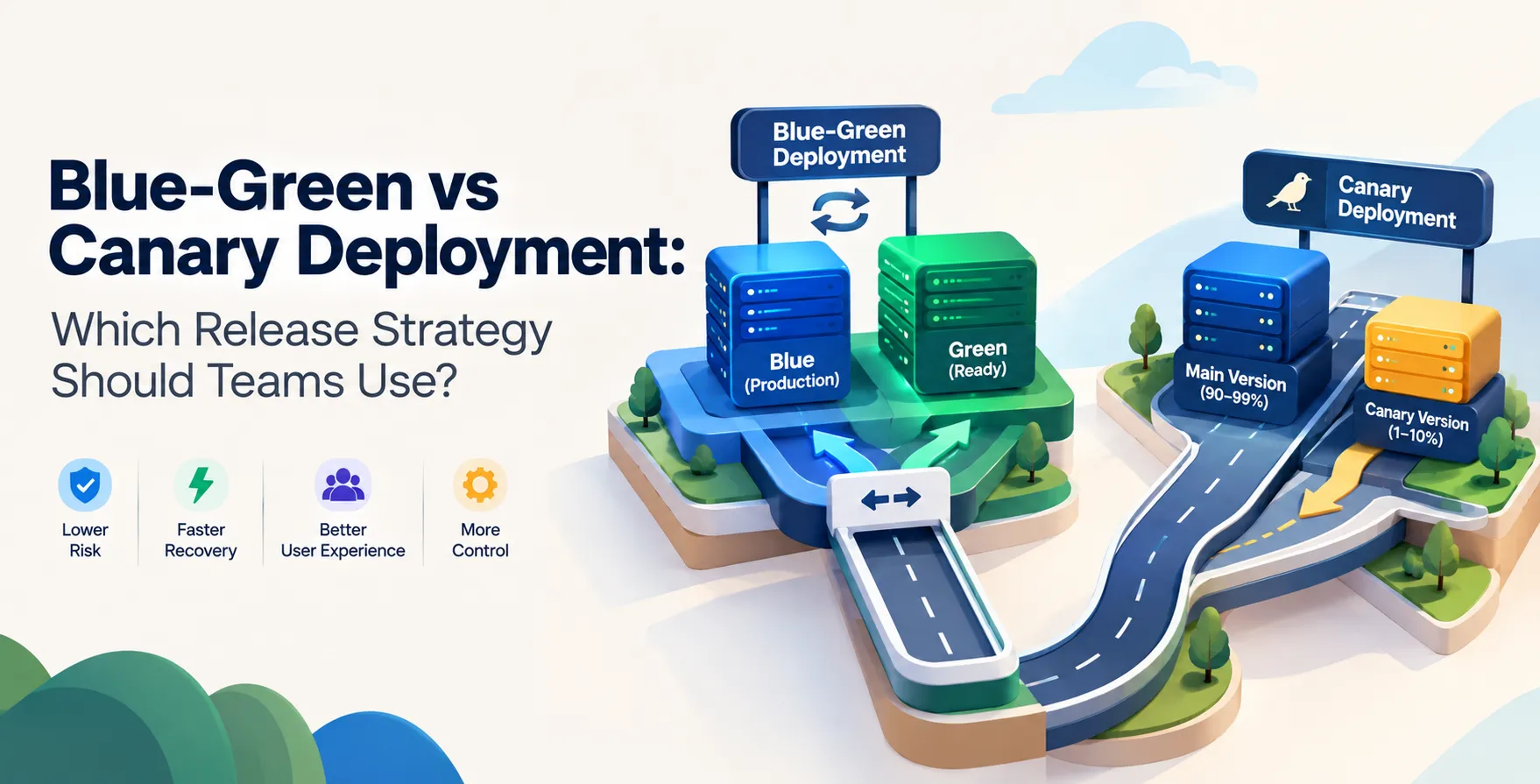
Blue-green deployment involves running two identical production environments. At any given time, only one environment, say the blue one, is live and serving all traffic.
When it is time to release a new version, you deploy your application to the green environment. Once testing confirms the green environment is healthy, you switch the router or load balancer to point to it.
The blue environment then becomes idle, acting as a standby for immediate rollback. This method provides a clean cutover between versions.
- Maintains two identical environments
- Provides instant rollback capability
- Minimizes downtime during switches
- Requires double the infrastructure capacity
Core Advantages of Blue-Green
The primary benefit of this approach is the ability to revert changes instantly. If something goes wrong in the green environment, you simply toggle the load balancer back to the blue one.
It also simplifies the testing process significantly. You can run full integration tests on the idle environment before it ever sees real user traffic.
Because the environments are completely isolated, you avoid issues related to shared state or partial deployments. It creates a predictable environment for every single release.
- Total environment isolation
- Simplified rollback procedure
- Predictable release cycles
- Reduced user impact
When to Choose Blue-Green
This strategy is ideal for monolithic applications where rolling updates are difficult to manage. If your application state is complex, maintaining two distinct versions can save you from data corruption.
It works best for teams that have the budget to maintain twice the infrastructure. You must be able to support two full stacks running simultaneously.
If your application cannot handle partial updates or rolling traffic changes, this is often the safest path. It provides a clean break between the old and the new.
What is Canary Deployment?
Canary deployment is a technique where you roll out changes to a small subset of your users before a full release. You route a tiny fraction of traffic to the new version while the rest stays on the old version.
As you gain confidence in the new version, you gradually shift more traffic to it. If errors occur, you only affect a small portion of your user base, significantly reducing the blast radius.
This approach relies heavily on monitoring to detect issues early. You must have robust observability in place to catch anomalies before they impact everyone.
- Gradual traffic shifts
- Reduced blast radius for bugs
- Real-world performance testing
- Requires advanced load balancing
Core Advantages of Canary Releases
The biggest advantage is the ability to test against real-world conditions. You see how the new version handles actual load rather than just synthetic tests.
It forces your team to invest in better observability and monitoring tools. You learn quickly if your new features are performing as expected in production.
Because you only expose a few users to the change, you can often catch performance regressions or edge-case bugs early. It makes the entire release process much more iterative and data-driven.
- Lower risk of widespread outages
- Faster feedback from users
- Iterative feature validation
- Efficient use of resources
When to Choose Canary
Canary releases are perfect for microservices architectures where you can easily route traffic at the service level. If you have a large user base, you can segment your traffic to minimize the impact of any potential issues.
This strategy is highly effective for teams practicing continuous delivery. It allows for a more fluid and less disruptive release process.
If you want to gather real-world usage data before committing to a full deployment, this is the right choice. It is a powerful tool for teams that prioritize fast feedback loops.
Comparing Deployment Strategies
| Feature |
Blue-Green |
Canary |
| Infrastructure Cost |
High |
Moderate |
| Rollback Speed |
Instant |
Gradual |
| Blast Radius |
Entire System |
Small Subset |
| Complexity |
Lower |
Higher |
Technical Prerequisites
Both of these deployment strategies require sophisticated infrastructure automation. You cannot manage these releases manually without introducing significant human error.
Effective deployment requires a robust CI/CD pipeline that handles the heavy lifting. You should also ensure your team understands how to perform proper software quality assurance services to validate builds before they hit the pipe.
Without automated health checks, you are essentially flying blind. You need confidence that your infrastructure can handle the shifting load without manual intervention.
Managing Risk in Production
Risk management is the ultimate goal of choosing between these models. You want to ensure that a bad release does not result in a total system failure.
Effective risk mitigation often includes using feature flags. These allow you to decouple deployment from release, giving you even more control over your environment.
Always remember that your strategy is only as good as your testing process. If your automated tests are weak, even the best deployment strategy will not save you from shipping broken code.
Automating Your Pipeline
Automation is the heartbeat of any successful release strategy. You should aim to make your deployments boring and repeatable through rigorous infrastructure configuration.
Consider how your team handles configuration management across different environments. You want to ensure consistency so that your staging environment accurately reflects production conditions.
When you automate the traffic shift, you remove the guesswork from the process. This allows your developers to focus on building features rather than managing release overhead.
Selecting the Right Strategy
There is no one-size-fits-all answer when comparing these approaches. Your decision should be based on your specific architectural constraints and budget.
If you have strict requirements for uptime and can afford the extra cost, blue-green is a reliable choice. If you want to move fast and have a distributed architecture, canary releases offer more agility.
Most mature engineering teams eventually adopt a hybrid model. They use different approaches depending on the specific service or application component being updated.
Conclusion
Choosing between blue-green and canary strategies is a foundational decision for your DevOps maturity. Both offer significant improvements over manual, high-risk releases.
The best strategy is the one that fits your team's current capabilities and infrastructure needs. Start by auditing your current pipeline and identifying where your risks are highest.
By prioritizing observability and automation, you create a safer path for your code. Always keep learning and adapting your approach as your system scales and evolves.


 In collaboration with