Table of Contents
- Introduction
- Understanding Message Lifecycle
- The Role of Visibility Timeout
- SQS Visibility Timeout Best Practices
- What is a Dead-Letter Queue?
- Configuring the Dead-Letter Queue
- Understanding SQS Redrive Policy maxReceiveCount
- Handling Poison Pill Messages
- Testing Your Message Processing Logic
- Monitoring and Alerts
- Integrating with Background Systems
- Comparing Standard and FIFO Queues
- Common Configuration Mistakes
- Conclusion
Introduction
Building a robust distributed system requires careful planning around how tasks are processed. When you use message queues to manage workloads, you need mechanisms to handle failures gracefully without losing data.
Amazon SQS provides the infrastructure to decouple your components, but misconfiguration can lead to message duplication or data loss. Mastering the interaction between message retention and retry policies is essential for any engineer working on modern cloud architectures.
Understanding Message Lifecycle
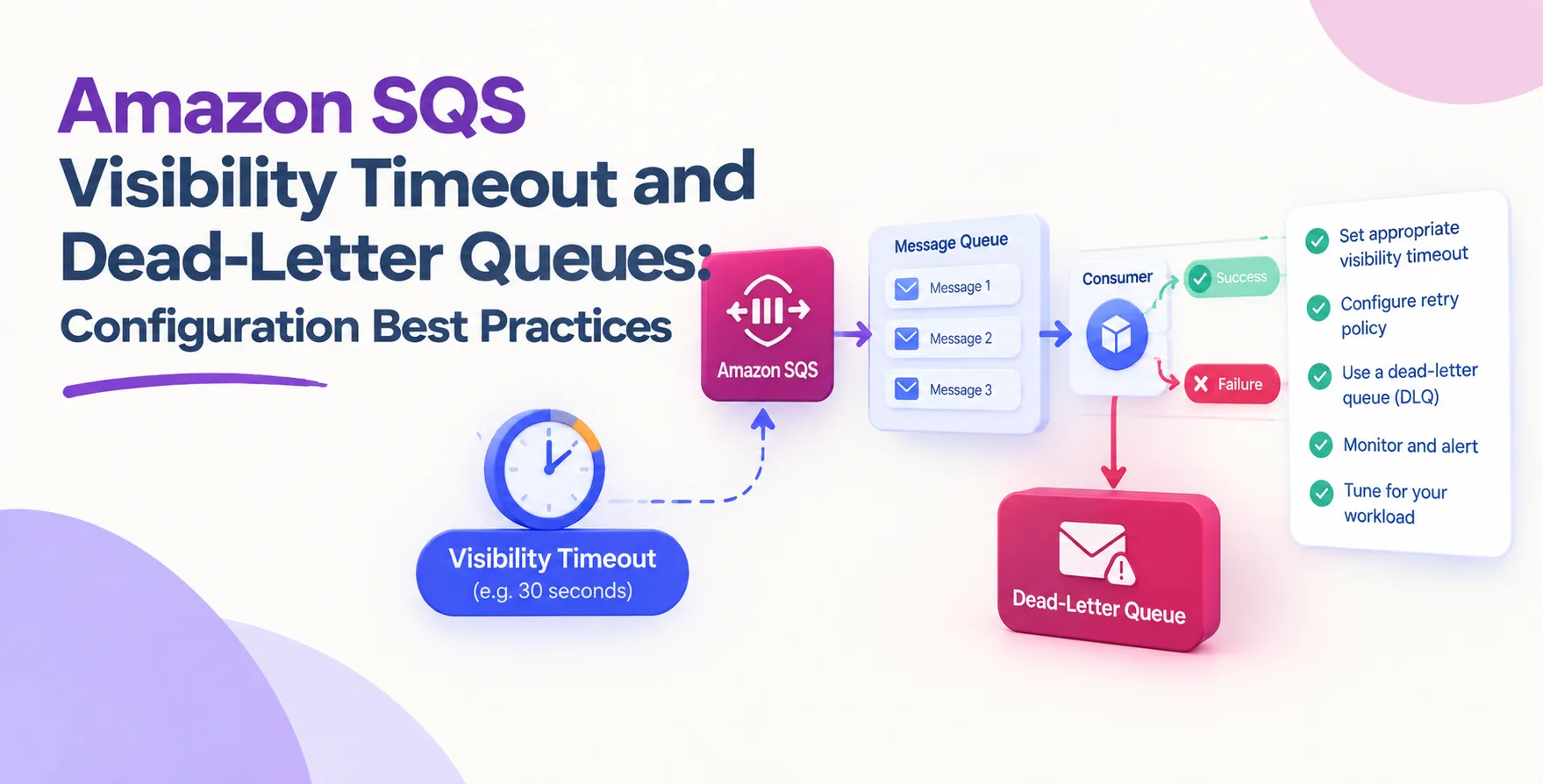
When a consumer polls a queue for messages, SQS does not immediately delete the message. Instead, it temporarily hides the message from other consumers to prevent duplicate processing.
If the consumer finishes the task successfully, it sends a delete request to the queue. If the consumer crashes or fails, the message becomes visible again for another attempt after the lock expires.
The Role of Visibility Timeout
The visibility timeout is the duration during which SQS prevents other consumers from receiving and processing a message. It essentially acts as a safety lock on your data.
If your processing time exceeds this window, another consumer might pick up the same message. This creates a race condition that leads to duplicate tasks in your backend systems.
SQS Visibility Timeout Best Practices
Setting the right value for your timeout requires balancing speed with safety. You want the window to be long enough for your longest task but short enough to recover from failures quickly.
- Analyze your average task duration
- Add a buffer for processing overhead
- Use Heartbeat patterns for long tasks
- Configure timeouts based on specific queues
Always base your timing on real performance data rather than arbitrary guesses. If you are building a reliable background job system for web applications, consider how these timeouts impact overall latency.
What is a Dead-Letter Queue?
An Amazon SQS dead-letter queue is a secondary destination for messages that cannot be processed successfully. It serves as a safety net for messages that repeatedly fail or exceed retry limits.
By isolating these problematic messages, you prevent them from blocking the main processing stream. This allows you to investigate the root cause without impacting the performance of your healthy services.
Configuring the Dead-Letter Queue
Setting up a dead-letter queue is a straightforward process within the AWS console or via Infrastructure as Code tools. You must define an ARN for the DLQ and attach it to your source queue.
Ensure that your permissions allow the source queue to send messages to the DLQ. Without these correct IAM settings, your system will fail to move messages during high-pressure scenarios.
- Create a dedicated DLQ resource
- Set appropriate retention periods
- Define clear naming conventions
- Verify IAM policy permissions
Always treat your DLQ as a diagnostic tool. You should have alerts set up to notify your engineering team whenever a message lands there.
Understanding SQS Redrive Policy maxReceiveCount
The SQS redrive policy maxReceiveCount determines how many times a message can be received before it is moved to the dead-letter queue. This is your primary control for failure thresholds.
A low value might push messages to the DLQ prematurely due to transient network issues. A high value might keep broken messages in your main queue for too long, wasting computing resources.
| Setting |
High maxReceiveCount |
Low maxReceiveCount |
| Recovery |
Resilient to spikes |
Sensitive to errors |
| DLQ Traffic |
Low volume |
High volume |
| Processing Waste |
High potential waste |
Lower potential waste |
Handling Poison Pill Messages
A poison pill is a message that causes your consumer to crash or fail every single time it is processed. These messages can effectively stall your entire pipeline if not handled correctly.
Your application code should include robust error handling to distinguish between transient failures and permanent ones. If a message is malformed, you should acknowledge it or move it to a failure bucket immediately.
Testing Your Message Processing Logic
Testing your configuration is just as important as writing the code. You should simulate failure scenarios to ensure your system behaves as expected under stress.
- Inject artificial processing delays
- Simulate consumer crashes during execution
- Check if messages return to the queue
- Verify messages eventually reach the DLQ
- Test message deletion after success
By running these tests, you gain confidence that your system will not lose data during an actual outage. Never deploy queue configurations without verifying the retry and failure logic in a staging environment.
Monitoring and Alerts
You cannot manage what you do not measure. Monitoring your queue health is a critical part of maintaining stable API development and integration.
Track metrics like ApproximateAgeOfOldestMessage and NumberOfMessagesSentToDLQ in CloudWatch. If you notice a spike in DLQ activity, investigate the logs for your consumers immediately.
Integrating with Background Systems
When you are building out your worker services, the queue is the heartbeat of your system. If the queue configuration is weak, your entire application layer becomes fragile.
Ensure your consumers are idempotent. Even with perfect timeouts, there is always a small chance that a message is processed twice due to network partitions or partial failures.
Comparing Standard and FIFO Queues
Standard queues provide best-effort ordering and high throughput. FIFO queues guarantee strict ordering and exactly-once processing, which is often required for financial or sequential data.
- Standard queues offer higher throughput
- FIFO queues provide exact ordering
- FIFO has stricter limits on throughput
- Visibility timeout works differently in FIFO
Choose your queue type based on your business requirements rather than convenience. The configuration trade-offs are significant for long-term maintenance.
Common Configuration Mistakes
Developers often forget to extend the visibility timeout when processing times increase during load. This leads to massive duplication and potential downstream database errors.
Another common mistake is ignoring the DLQ entirely. Without a DLQ, messages that fail repeatedly stay in the queue indefinitely, consuming resources and hiding underlying application bugs.
Conclusion
Effective queue management is a cornerstone of scalable software architecture. By focusing on the correct Amazon SQS visibility timeout and dead-letter queues configuration best practices, you build systems that are resilient to failure.
Always audit your retry policies and ensure your consumers are prepared for the realities of distributed systems. With proper monitoring and testing, you can maintain high performance and data integrity as your application grows.


 In collaboration with