Table of Contents
- Introduction to Deep Linking
- What is Mobile Deep Linking?
- Why Your App Needs Better Routing
- Understanding Deep Linking Mechanisms
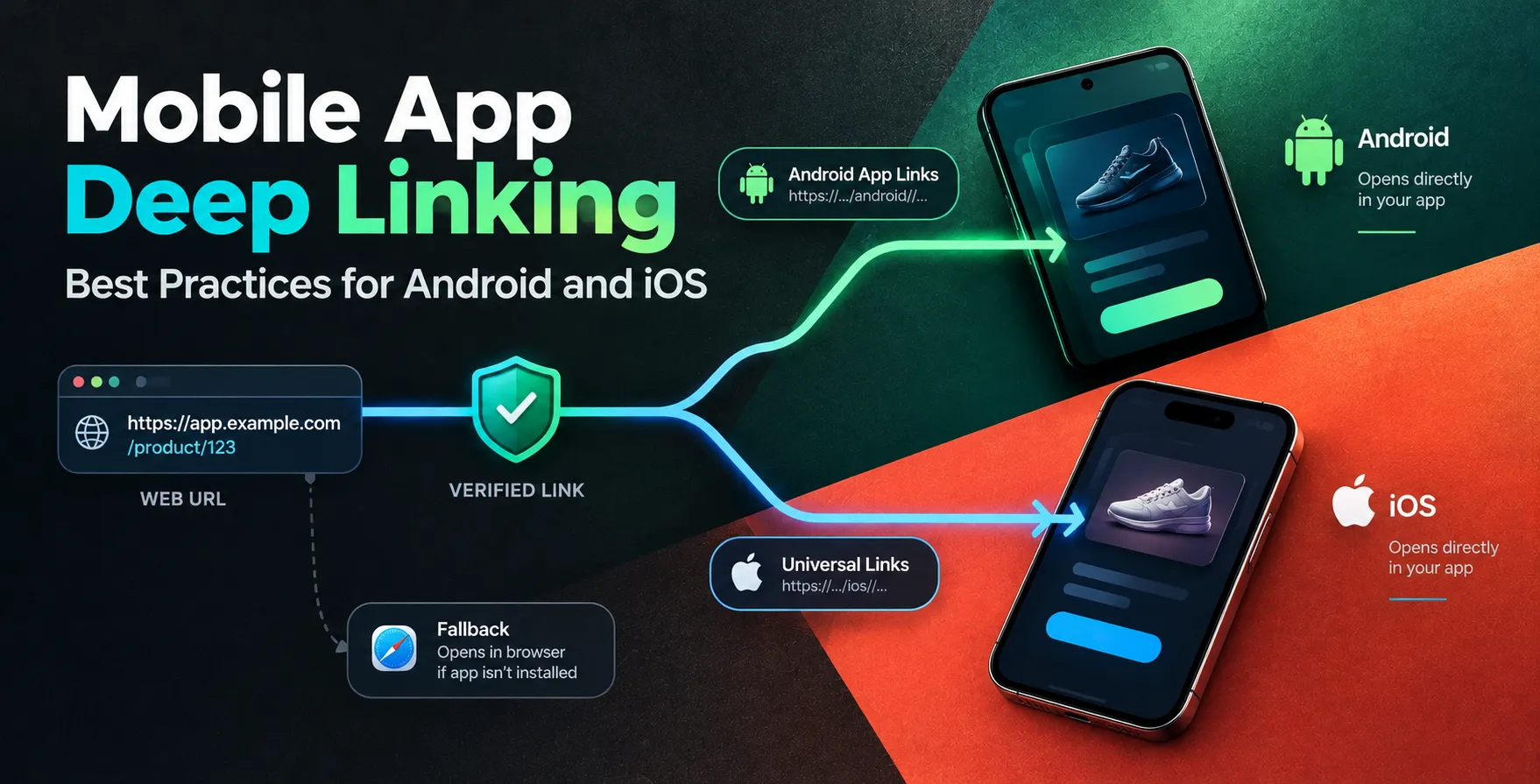
- Android App Links vs Universal Links
- Implementing Deferred Deep Linking
- Common Routing Challenges
- Best Practices for Implementation
- Handling Edge Cases
- Testing Your Deep Links
- Measuring User Engagement
- Security Considerations
- Final Thoughts
Introduction to Deep Linking
In the competitive world of mobile app development, user retention is everything. If a user clicks a link in an email or a social media post, they expect to land directly on the relevant content inside your application.
Without a robust navigation strategy, users often land on a generic home screen instead of the product or feature they intended to see. This friction leads to frustration and high drop-off rates.
What is Mobile Deep Linking?
Mobile deep linking serves as the bridge between the web and your native application. It allows developers to route users to specific screens or data points within an app, effectively bypassing the entry path.
Whether a user is coming from a website, an email campaign, or an advertisement, mobile deep linking ensures a seamless transition. By reducing the number of taps required to reach specific content, you significantly improve the user journey.
- Directs users to specific app pages
- Increases engagement for specific features
- Boosts conversion rates significantly
- Provides a unified user experience
Why Your App Needs Better Routing
Modern users demand speed and efficiency. When they follow a link, they expect the app to handle the context immediately, whether they are new users or existing customers.
If you ignore these routing patterns, you lose the ability to personalize the onboarding process. Proper deep linking allows you to pass parameters that define the user's initial state upon launch.
Understanding Deep Linking Mechanisms
Deep linking operates by intercepting URIs or specific web addresses. When a system detects a match, it triggers the associated application instead of opening the mobile browser.
There are different categories of links that developers must manage. Understanding how these behave on different platforms is crucial for successful implementation.
- Standard deep links
- Deferred deep linking
- Contextual routing
Android App Links vs Universal Links
The landscape for handling links differs between operating systems. Developers must understand the nuances of Android App Links vs Universal Links to ensure a consistent experience across devices.
Android App Links
Android uses a verification process to ensure the app is the authorized handler for a web domain. This prevents other apps from intercepting your traffic.
- Uses digital asset links
- Verifies domain ownership
- Provides a seamless user experience
- Avoids manual user prompts
Universal Links
iOS handles redirection through a mechanism that links a web URL to the application bundle. This requires an association file hosted on your server.
- Provides secure app associations
- Handles web-to-app transitions smoothly
- Requires specific server configuration
- Supports deep linking natively
Implementing Deferred Deep Linking
Deferred deep linking is the solution for users who have not yet installed your application. When a user clicks a link, they are redirected to the App Store or Play Store.
Once they download and open the app for the first time, the system passes the original link data to the application. This allows you to show the user the content they originally wanted to see after they have finished the installation.
| Mechanism |
Existing User |
New User |
| Standard Link |
Direct open |
Landing page |
| Deferred Link |
N/A |
Content after install |
| Universal Link |
App transition |
Browser fallback |
| Android App Link |
App transition |
Browser fallback |
Common Routing Challenges
Implementing reliable navigation is rarely straightforward due to fragmented device ecosystems. Developers often face issues where the app fails to open or the deep link data is lost during the installation process.
Another frequent challenge involves handling links when the app is in the background versus completely closed. You must ensure your lifecycle methods correctly parse incoming intents or user activities.
- Managing link data persistence
- Handling complex URL schemas
- Ensuring consistent browser fallback
- Managing app state restoration
Best Practices for Implementation
To master mobile app deep linking best practices for Android and iOS, focus on security and user experience. Always prioritize the user's current context when they arrive at your application.
Test your implementation across various devices and network conditions to ensure consistency. Use robust logging to track where users are coming from and which paths they take most frequently.
- Always use HTTPS for domains
- Keep deep link structures simple
- Provide helpful fallback pages
- Validate all incoming parameters
- Use standardized naming conventions
Handling Edge Cases
Not every click results in a perfect transition. Sometimes the app crashes or the requested content is no longer available, requiring graceful error handling.
You should design your app to handle invalid links by redirecting users to a safe default page. Never leave the user on a blank screen or a broken transition.
Testing Your Deep Links
Rigorous testing is the only way to guarantee that your routing works as expected. You must verify that your links function correctly on both fresh installations and after updating an existing app.
Use automated testing tools to simulate clicks from various sources. Verify that the app correctly parses the parameters once it is launched.
- Test on physical devices
- Check deep link persistence
- Validate store redirection
- Review browser fallback behavior
- Test with cold starts
Measuring User Engagement
Analytics are essential for understanding the effectiveness of your routing strategy. You need to know how many users click your links and how many actually complete the journey to the target content.
By tracking these metrics, you can identify bottlenecks in your funnel. Use this data to refine your messaging and improve the overall conversion rate of your campaigns.
Security Considerations
Security should never be an afterthought when building navigation systems. Malicious actors can sometimes exploit poorly implemented links to trigger unwanted actions within your application.
Always validate that the data passed through a link is safe before using it to perform sensitive operations. Treat all incoming deep link parameters as untrusted inputs to protect your users.
Final Thoughts
Deep linking is a cornerstone of a functional and engaging mobile experience. By implementing these strategies correctly, you ensure that your users reach their destination without unnecessary hurdles.
Stay updated with the latest OS changes to maintain your implementation's integrity. Consistent testing and data-driven improvements will keep your app at the top of its game.


 In collaboration with