Table of Contents
- Introduction to Consent Mode
- Why Move to Server-Side Tagging
- Understanding Google Consent Mode
- The Role of Server-Side Containers
- Prerequisites for Implementation
- Configuring the Server Container
- Setting Up GA4 Server-Side Consent Mode
- Google Ads Consent Mode Implementation
- Handling Consent Signals
- Testing Your Implementation
- Data Privacy and Compliance
- Common Pitfalls to Avoid
- Performance Considerations
- Conclusion
Introduction to Consent Mode
Data privacy regulations are changing the way marketers collect information. Google Consent Mode with server-side tagging GA4 and Google Ads setup provides a robust framework to balance user privacy with essential data collection.
By leveraging this approach, you can respect user choices while still gathering actionable insights. This modern architecture ensures that your analytics remain compliant without sacrificing the quality of your marketing data.
Why Move to Server-Side Tagging
Traditional browser-based tagging is increasingly hindered by ad blockers and strict cookie policies. Moving your tracking logic to a server-side container offers better control over the data being sent to third-party platforms.
Server-side tagging acts as a secure gateway for your data streams. It allows you to filter, modify, or redact sensitive information before it reaches vendors like Google or Facebook.
- Bypasses client-side ad blockers
- Increases data security and privacy
- Reduces browser-side resource usage
- Improves overall page load speed
Understanding Google Consent Mode
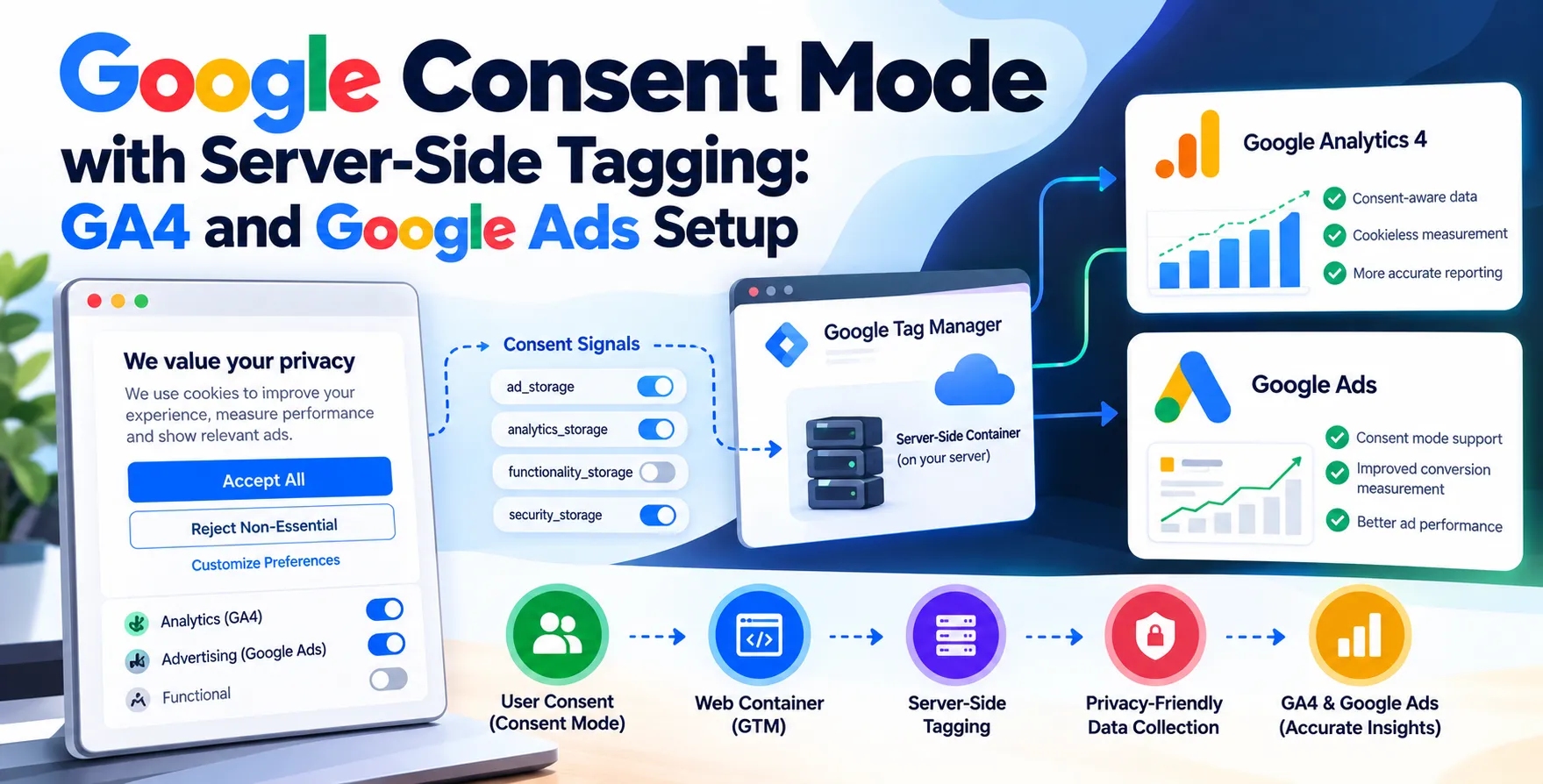
Google Consent Mode allows your website to adjust how tags behave based on the consent status of your visitors. It effectively bridges the gap between user privacy preferences and your measurement needs.
When a user denies consent, the system sends pings instead of full data packets. These pings allow platforms to perform conversion modeling and fill in the gaps for missing data.
Implementing Google Consent Mode server-side tagging adds an extra layer of governance. It ensures that the processing of these signals happens in a controlled server environment rather than on the user's device.
The Role of Server-Side Containers
A server-side container in Google Tag Manager functions as a middleman between your website and marketing platforms. It receives data from the browser and then dispatches it to the relevant destinations.
This centralized hub simplifies the management of complex tracking setups. Instead of managing multiple triggers in the browser, you process everything in one place.
- Centralized data routing
- Enhanced visitor privacy control
- Easier maintenance of tag configurations
- Robust server-level debugging
Prerequisites for Implementation
Before beginning your configuration, ensure you have a functional Google Tag Manager web container. You will also need a Google Cloud Platform account to host your server-side environment.
Familiarize yourself with your organization's data privacy policies. You must also have a consent management platform that supports the current standards for signal transmission.
Configuring the Server Container
Setting up your server container involves provisioning a cloud server and pointing your custom subdomain to it. This configuration is critical for maintaining first-party data integrity.
Once the infrastructure is live, you need to configure your web container to send data to this specific server URL. This transition marks the move from direct browser-to-vendor communication to a mediated flow.
Infrastructure Setup Steps
Follow these steps to ensure your server environment is properly configured for high-traffic environments:
- Create a new server-side container in GTM.
- Provision the server on Google Cloud Platform.
- Map your custom domain to the server URL.
- Update the transport URL in your web container.
These steps ensure that your tracking infrastructure is stable and scalable.
Setting Up GA4 Server-Side Consent Mode
To achieve successful GA4 server-side consent mode, you must pass consent parameters from the client to the server. The server container then reads these signals to decide whether to trigger GA4 tags.
This method ensures that your analytics platform only receives data that complies with the user's specific choices. It also enables advanced modeling features within your dashboard.
- Pass consent state in data layers
- Configure server-side client triggers
- Apply transformations to incoming requests
- Validate tag firing based on signals
This setup keeps your analytics data clean and compliant with regional laws.
Google Ads Consent Mode Implementation
Google Ads consent mode implementation requires careful mapping of consent categories. These categories dictate whether your advertising tags can set cookies or read stored identifiers.
When a user provides consent, your conversion tracking continues to operate as normal. When they decline, Google Ads utilizes conversion modeling to estimate campaign performance.
| Consent Type |
Purpose |
Data Handling |
| ad_storage |
Enables ad cookies |
Uses pings if denied |
| analytics_storage |
Enables analytics cookies |
Uses pings if denied |
| ad_user_data |
User-provided ad data |
Restricted if denied |
| ad_personalization |
Personalized ad targeting |
Restricted if denied |
Handling Consent Signals
Processing consent signals requires a deep understanding of your data flow. The server container must intercept the consent parameters and use them as conditions for every outgoing request.
If a signal is missing or invalid, you should implement a fallback mechanism. This ensures that you do not accidentally collect data from users who have not made a choice.
Testing Your Implementation
Testing is the most important phase of any tracking deployment. Use the debug mode in both your web and server containers to monitor the flow of requests in real-time.
Check the console logs for consent status updates. Verify that the tags fire only when the correct consent state is detected by your server-side logic.
- Simulate various user consent scenarios
- Verify payload contents in preview mode
- Monitor server-side error logs
- Check GTM debug console output
- Validate data in GA4 real-time reports
- Ensure Google Ads pings are recorded
Data Privacy and Compliance
Compliance is not a one-time project; it requires continuous monitoring. Regularly audit your server-side configuration to ensure it aligns with the latest privacy regulations.
Document your data processing activities clearly. Transparency with your users about how their data is handled builds trust and ensures long-term success.
Common Pitfalls to Avoid
Avoid hardcoding consent logic directly into your tags, as this is prone to errors. Instead, rely on the built-in consent settings provided by Google Tag Manager.
Do not forget to test for edge cases like partial consent or revoked choices. Missing these scenarios can lead to data gaps or potential compliance issues.
Performance Considerations
Server-side tagging can slightly increase latency if not optimized. Use efficient server configurations and minimize the number of hops between the browser and the server.
Monitor your server costs to ensure they remain within budget. Optimize your data processing scripts to reduce the compute resources required for each event.
Conclusion
Implementing Google Consent Mode with server-side tagging is a strategic move for modern digital marketing. It protects user privacy while maintaining the integrity of your marketing data.
By following this guide, you can ensure that your GA4 and Google Ads setups are ready for the future of privacy-first measurement. Stay consistent with your testing and always prioritize user consent.


 In collaboration with