Table of Contents
- Introduction
- Understanding S3 Versioning
- How Versioning Protects Your Data
- Limitations of Versioning for Security
- What is Amazon S3 Object Lock?
- Implementing Immutable Cloud Backups
- Key Differences in Governance
- When to Use Which Mechanism
- Security Implications for DevOps
- Comparing S3 Protection Features
- Best Practices for Backup Integrity
- Automating Lifecycle Policies
- Final Thoughts
Introduction
When you architect a storage strategy on AWS, data safety is the ultimate priority. Developers often get confused between native object history and advanced compliance features when configuring their buckets.
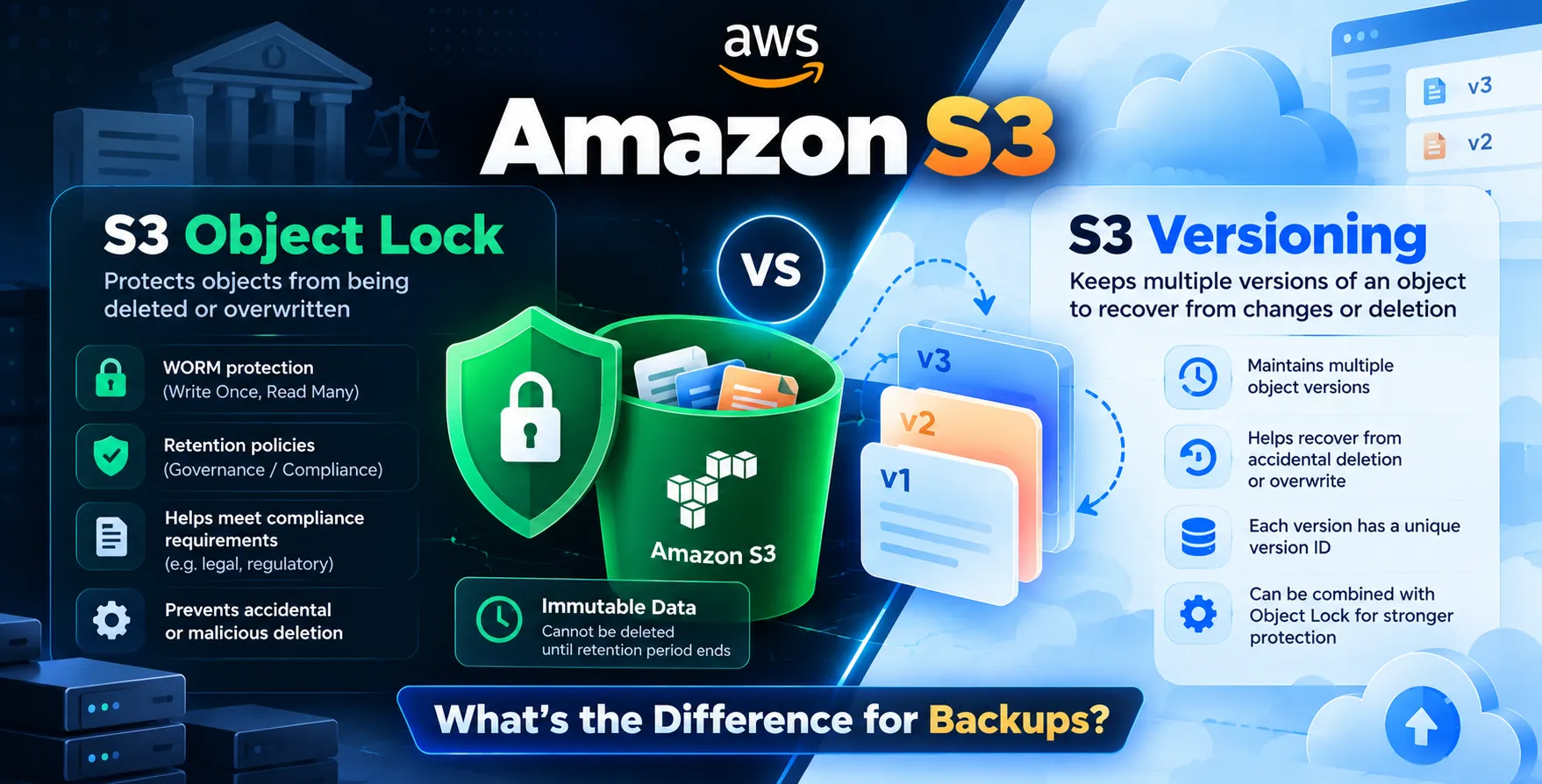
Understanding the distinction between Amazon S3 Object Lock vs Versioning what's the difference for backups is essential for any engineer. While both features help manage object lifecycle and safety, they serve fundamentally different purposes in a production environment.
Understanding S3 Versioning
At its core, S3 Versioning is a mechanism to preserve, retrieve, and restore every version of every object stored in your buckets. Once enabled, S3 generates a unique version ID for every new upload, overwrite, or deletion request.
This means if you accidentally delete an object, it is not actually removed from the storage system. Instead, S3 inserts a delete marker, effectively hiding the current version while keeping the previous ones fully intact.
- Maintains historical object states
- Enables easy recovery from accidental overwrites
- Allows restoration of deleted files
- Provides simple audit trails
Versioning acts as a safety net for human error during routine development tasks. It ensures that critical files remain recoverable even after common operational mistakes.
How Versioning Protects Your Data
Versioning provides a basic layer of data resilience by decoupling the act of deletion from the physical removal of data. Without this feature, an application error or a malicious script could wipe your data permanently in milliseconds.
By keeping multiple versions, you ensure that you can roll back to a known good state. This is especially useful during deployment cycles where configuration files or database dumps might be overwritten frequently.
However, it does not prevent a user with sufficient permissions from deleting the versions themselves. The data is only protected from accidental modification, not from targeted, authorized destruction.
- Supports rapid rollback processes
- Keeps multiple data iterations
- Facilitates simple disaster recovery
Limitations of Versioning for Security
While useful for operational stability, standard versioning is not a substitute for true compliance. An attacker who gains administrative access to your AWS account can delete all versions of an object, bypassing the safety net entirely.
If your threat model includes ransomware or malicious insiders, versioning alone will fail to protect your data. It assumes that the person managing the bucket is acting in good faith or is merely prone to accidents.
For enterprise-grade security, you need a way to make files physically impossible to delete for a specified period. This is where more robust storage constraints become necessary.
What is Amazon S3 Object Lock?
Amazon S3 Object Lock is a specialized feature designed to meet regulatory compliance and security requirements. It allows you to store objects using a write-once-read-many (WORM) model.
Once a file is locked, no user—not even the root account—can delete or modify the object until the retention period expires. This creates a hard barrier against any form of unauthorized data tampering.
This feature is vital for industries that require strict adherence to data retention laws. It turns standard buckets into highly secure, unalterable archives.
- Prevents all forms of deletion
- Enforces strict compliance standards
- Provides legal hold capabilities
- Protects against ransomware encryption
Implementing Immutable Cloud Backups
To create truly immutable cloud backups, you must combine locking mechanisms with your existing data pipelines. Simply storing files is not enough if they remain vulnerable to being encrypted by attackers.
By applying a retention period to your backups, you ensure they remain untouched by any process until the policy finishes. This is the gold standard for protecting against modern cyber threats that target backup infrastructure.
Integrating this with your automated infrastructure ensures that your data protection strategy scales without manual intervention. It allows your team to focus on deployment without worrying about the integrity of your archived assets.
Key Differences in Governance
The governance model between these two features is distinct. Versioning is an open, flexible system, while Object Lock is a restrictive, compliance-focused system.
Versioning is designed for operational recovery during normal business processes. Object Lock is designed for security and compliance during adverse events or legal requirements.
- Versioning is permissive and user-managed
- Object Lock is restrictive and policy-enforced
- Versioning permits deletion by admins
- Object Lock prevents all deletion
When to Use Which Mechanism
Choosing the right tool depends on your specific use case and risk profile. Most production environments actually require a combination of both for maximum efficiency.
Use versioning for your active development buckets where files change frequently. Use Object Lock for your long-term archival buckets where data must remain unchanged for years.
Operational Workflows
When you need to iterate quickly on configuration files or assets, versioning provides the flexibility to revert changes without friction. It is the best choice for everyday development cycles.
- Frequent file modifications
- Rapid prototyping environments
- Standard user-facing application data
Compliance Archives
When you need to store logs, financial records, or critical system snapshots for multi-year periods, you should strictly enforce locks. This guarantees data integrity against all threats.
- Financial audit logs
- Regulatory storage requirements
- Critical disaster recovery snapshots
Security Implications for DevOps
For DevOps teams, the configuration of S3 must be handled with extreme care. Misconfiguring these settings can lead to either data loss or excessive storage costs over time.
You must ensure that your cloud deployment pipelines handle these settings correctly during environment provisioning. If you are managing your infrastructure as code, make sure your templates explicitly define retention periods.
Always remember that locking objects increases costs because you cannot delete them early. You should monitor your storage usage to ensure you are not paying for unnecessary data that has outlived its usefulness.
Comparing S3 Protection Features
| Feature |
S3 Versioning |
S3 Object Lock |
| Primary Goal |
Operational Recovery |
Data Compliance |
| Delete Protection |
Partial (Delete Markers) |
Full (WORM) |
| Access Level |
Administrator |
Policy-Restricted |
| Retention |
Indefinite |
Time-Bound |
| Complexity |
Low |
Medium |
Best Practices for Backup Integrity
Maintaining high-quality backups requires consistent application of security policies across all regions. You should never rely on default settings for your critical storage buckets.
Review your bucket policies regularly to ensure that no unauthorized changes have been made. Use automated monitoring tools to alert you if a bucket is modified or if a lock policy is altered.
- Enable MFA delete for sensitive buckets
- Use lifecycle policies to transition old data
- Audit bucket configurations quarterly
- Test recovery workflows periodically
Always assume that a breach is possible and design your storage layer to be resilient to compromised credentials. By limiting the blast radius of an account takeover, you protect your most valuable assets.
Automating Lifecycle Policies
Lifecycle rules allow you to transition objects between storage classes or expire them automatically. This is essential for managing costs as your data grows over time.
When using Object Lock, you must be careful not to create conflicting rules that prevent deletion of old data. Proper planning ensures you maintain compliance without ballooning your monthly cloud bill.
Always document your lifecycle logic clearly. This helps other team members understand why certain objects are kept or deleted, reducing the chance of accidental configuration errors during future updates.
Final Thoughts
Managing data integrity is a critical responsibility for any software organization. Understanding the role of versioning versus locking mechanisms is the first step toward building a robust storage architecture.
By leveraging these features appropriately, you protect your infrastructure from both human error and malicious intent. Prioritize your security requirements and implement the right protection strategy for each bucket in your environment.


 In collaboration with