Table of Contents
- Introduction to Kafka Consumer Lag
- Why Consumer Lag Impacts Performance
- Understanding How Kafka Lag Occurs
- The Basics of Kafka Consumer Group Monitoring
- Tools for Diagnosing Backlogs
- How to Identify Consumer Bottlenecks
- Defining Effective Kafka Lag Alert Thresholds
- Strategies for Reducing Lag
- Scaling Consumers for Throughput
- Partitioning and Parallel Processing
- Automated Alerting Best Practices
- Maintaining System Health Over Time
- Conclusion
Introduction to Kafka Consumer Lag
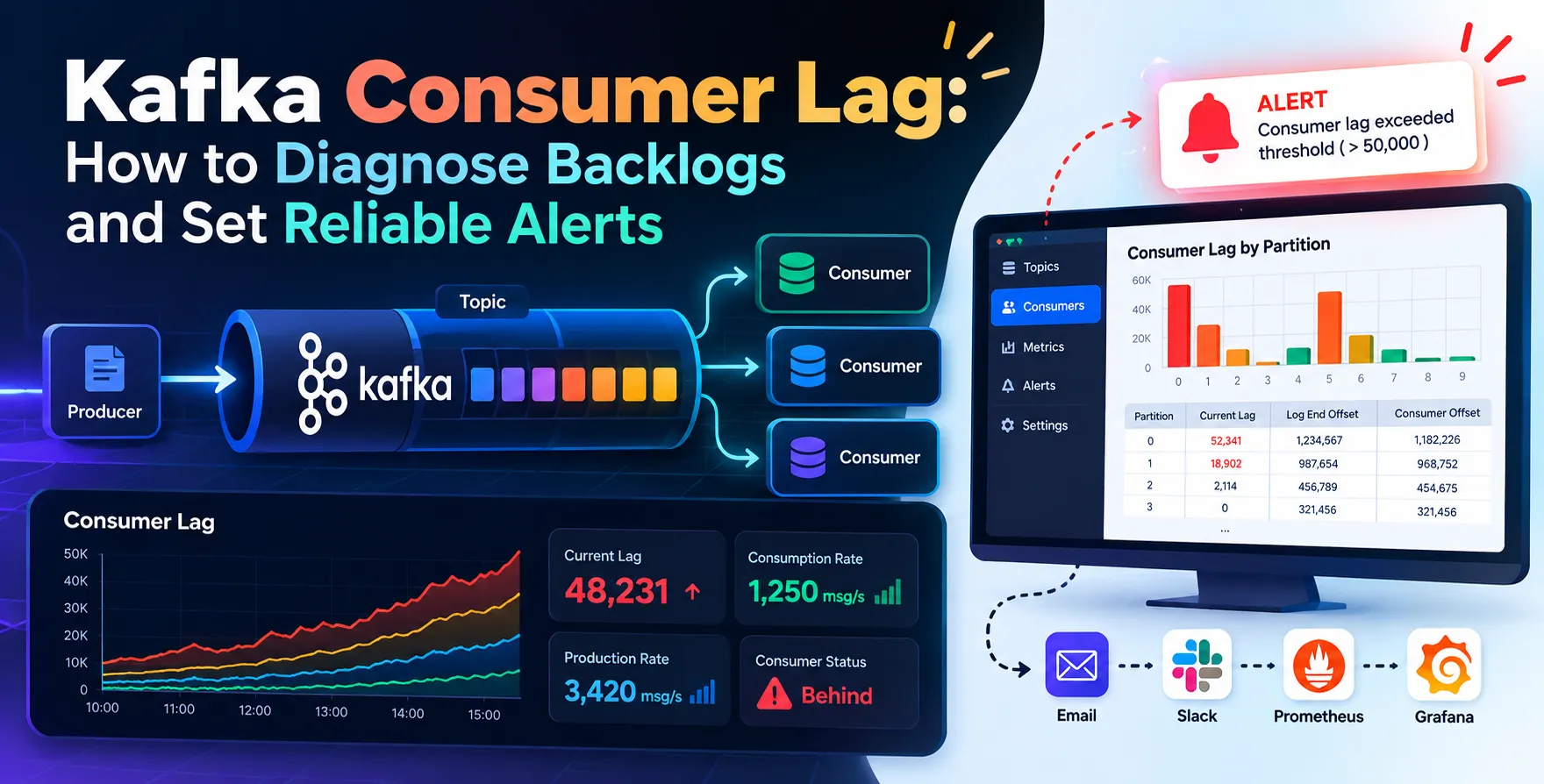
In distributed event streaming architectures, maintaining a balance between data production and consumption is critical. Kafka consumer lag represents the gap between the latest message written to a partition and the last message processed by a consumer group.
When this gap grows, your system experiences latency, which can degrade the user experience significantly. Understanding the nuances of this metric is the first step toward building a robust and responsive data pipeline.
As a developer, you must treat lag as a primary indicator of system health. Ignoring it often leads to silent failures where downstream services process stale data long after events occur.
- Indicates processing delays
- Signals potential scaling needs
- Impacts end-to-end latency
Why Consumer Lag Impacts Performance
Lag directly translates to delayed business logic execution. If your application relies on real-time data, any increase in processing time causes a ripple effect across your entire architecture.
High lag can lead to resource exhaustion if you attempt to catch up by suddenly scaling up consumers. It also creates a backlog that might eventually exceed retention periods if not addressed promptly.
Effective monitoring ensures that you aren't just reacting to outages but proactively managing system throughput. Consistent performance requires a deep understanding of your consumers' processing capabilities.
- Increased data staleness
- Risk of data loss via retention expiry
- Degraded user experience
- Resource management challenges
Understanding How Kafka Lag Occurs
Lag typically occurs when the rate of incoming messages exceeds the rate at which your consumers can process them. This imbalance is common during traffic spikes or when consumer logic becomes computationally intensive.
Another frequent cause is consumer instability. If a consumer crashes, the group must rebalance, and the new consumer may start from an older offset, temporarily inflating the measured lag.
Network partitions or database locks further exacerbate these issues. You should always look at the relationship between your producer throughput and the processing time of your consumer application.
- High producer traffic volume
- Heavy processing logic
- Consumer group rebalancing events
- Infrastructure limitations
The Basics of Kafka Consumer Group Monitoring
Effective monitoring requires visibility into offset positions at both the partition and group levels. You need to compare the log end offset with the committed offset for every partition your group consumes.
Using built-in tools or third-party observability platforms allows you to track these metrics over time. Without this continuous visibility, you are essentially flying blind during peak load periods.
Standardizing how you report these metrics ensures that your team shares a common language when debugging issues. Consistent data points enable faster incident response and better long-term architectural planning.
- Track committed offsets
- Monitor log end offsets
- Observe rebalance frequency
- Visualize lag trends
Tools for Diagnosing Backlogs
Using Command Line Utilities
The native Kafka tools provide a quick way to inspect group state. These utilities are essential for ad-hoc debugging in terminal sessions.
- kafka-consumer-groups.sh script
- Describe group command
- Offset status checks
Use these utilities to verify that your consumers are actually active and reading from the expected partitions. They offer the most direct view of your current state without overhead.
Observability Platforms
Managed platforms and modern monitoring stacks offer rich dashboards for visualizing consumer health. These tools usually integrate directly with your metric collectors to provide alerts.
- Prometheus and Grafana
- Datadog integration
- Confluent Control Center
These platforms provide historical data that helps in identifying seasonal traffic patterns. They are superior to command-line tools for long-term trend analysis and alerting.
How to Identify Consumer Bottlenecks
Identifying bottlenecks requires profiling your consumer code. Often, the culprit is not the network but a specific block of code that performs synchronous I/O or database operations.
Check if your processing logic includes external API calls that are slow. If your consumer spends most of its time waiting for a response, it will never reach its potential throughput.
Monitor CPU usage and memory pressure on the consumer nodes. If these resources are maxed out, your application is hardware-bound and requires vertical or horizontal scaling to reduce lag.
- Synchronous network calls
- Database query latency
- Inefficient batch processing
- Resource starvation
Defining Effective Kafka Lag Alert Thresholds
Setting proper Kafka lag alert thresholds requires understanding your business requirements. A static number might be fine for some systems, while others need dynamic alerts based on rate of change.
Start by establishing a baseline for normal operations. If your typical lag is near zero, a small spike might be an anomaly worth investigating, while a consistently high lag might be expected during batch processing.
Avoid "alert fatigue" by tuning your thresholds carefully. If you alert on every minor spike, your team will eventually ignore the warnings, which is dangerous for production systems.
- Static absolute thresholds
- Percentage-based alerts
- Time-to-catch-up metrics
- Dynamic moving averages
Strategies for Reducing Lag
The first step in reducing lag is optimizing your consumer logic. Minimize the work done per message and increase the batch size if your use case allows for it.
Consider moving non-critical processing to a separate asynchronous path. This allows the primary consumer to remain fast and responsive, avoiding unnecessary delays.
Finally, ensure that your Kafka broker configuration is not the bottleneck. Check partition counts and cluster performance to ensure that data is being ingested and served at expected speeds.
- Batch processing optimization
- Asynchronous execution paths
- Consumer logic refactoring
- Broker performance tuning
Scaling Consumers for Throughput
Horizontal scaling is the most common way to handle increased load. By adding more instances to your consumer group, you can distribute the workload across more CPUs.
Remember that you cannot have more active consumers than you have partitions in a topic. If you need more throughput, you must increase the partition count on your Kafka topic.
This change requires careful planning and coordination with your upstream producers. Always test your consumer scaling strategy in a staging environment before pushing to production.
| Scaling Method |
Pros |
Cons |
| Vertical Scaling |
Easy to implement |
Hardware limits |
| Horizontal Scaling |
High throughput |
Requires partition rebalance |
| Batching |
Reduces overhead |
Higher latency |
Partitioning and Parallel Processing
Partitioning is the fundamental mechanism for parallelizing consumption. Each partition is assigned to a single consumer instance within a group, ensuring ordered processing for that specific partition.
If you have a high-volume topic, ensure your partition count is high enough to support the number of consumers you plan to run. This setup is crucial for achieving high throughput without creating massive lag.
Be mindful of hot partitions, where one partition receives significantly more traffic than others. This scenario leads to uneven load distribution and forces some consumers to work harder while others remain idle.
- Balanced partition distribution
- Consistent hashing strategies
- Effective partition sizing
- Parallel consumer threads
Automated Alerting Best Practices
Automation is the key to maintaining a healthy system. Configure your alerting system to notify you through multiple channels, such as email, Slack, or automated incident management tools.
Include enough context in your alerts to make debugging easier. A good alert contains the consumer group name, the topic, the partition, and the current lag value.
Set up different severity levels. A minor lag increase might trigger a warning, while a persistent, massive backlog should trigger an urgent page to the on-call engineer.
- Clear alert descriptions
- Severity-based routing
- Multi-channel notifications
- Actionable remediation links
Maintaining System Health Over Time
Maintenance is an ongoing process that involves regular reviews of your consumer performance. Periodically check your lag metrics even when things seem to be running smoothly.
As your application evolves, your traffic patterns will change. Ensure your infrastructure and configuration are updated to reflect these new realities and potential growth.
Documentation is also a part of maintenance. Keep your runbooks updated so that new team members know exactly how to diagnose and fix lag issues when they occur.
- Regular metric audits
- Configuration review sessions
- Team training and runbooks
- Continuous capacity planning
Conclusion
Mastering the art of monitoring and managing Kafka consumer lag is essential for any engineer working with distributed systems. By diagnosing bottlenecks early and setting intelligent alerts, you ensure your data pipelines remain reliable.
Remember that the goal is not to eliminate lag entirely, but to keep it within bounds that satisfy your business requirements. Stay proactive and keep your architecture scalable to handle future growth.
- Proactive monitoring strategy
- Strategic scaling choices
- Optimized consumer architecture
- Continuous improvement mindset


 In collaboration with